

Enterprises running SAP ERP and SAP S/4HANA operate in increasingly demanding service environments.
Customers, distributors, and partners expect real-time visibility into sales orders, delivery tracking, and billing documents through simple, conversational channels. Traditional engagement methods such as call centers, email support, and self-service portals often introduce latency, increase operational costs, and degrade customer experience.
WhatsApp has emerged as a dominant enterprise communication platform, offering secure, conversational messaging with global reach. By integrating WhatsApp Business with SAP back-office systems, organizations can automate status and document requests, proactively notify users of business events, and securely deliver business documents—all while reducing repetitive support workload and improving service responsiveness.
This post presents a practical, enterprise-grade framework for integrating WhatsApp Business with SAP ERP and SAP S/4HANA, anchored by one detailed, end-to-end implementation example that practitioners can adapt to their own landscapes.

Why WhatsApp Integration Matters for SAP Landscapes
SAP systems remain the system of record for enterprise business transactions, covering sales orders, deliveries, invoices, and logistics events. The practical challenge is not whether the data exists, but how to expose the right data to the right person securely, while keeping the experience fast and conversational.
A WhatsApp-based integration layer helps organizations provide real-time order visibility, deliver documents (order confirmations, invoices, and e-invoices), and reduce repetitive support inquiries. From an IT standpoint, the integration must enforce SAP-native authorization, minimize data exposure, use encrypted transport, and maintain end-to-end traceability.
Reference Architecture: SAP + WhatsApp Enterprise Integration
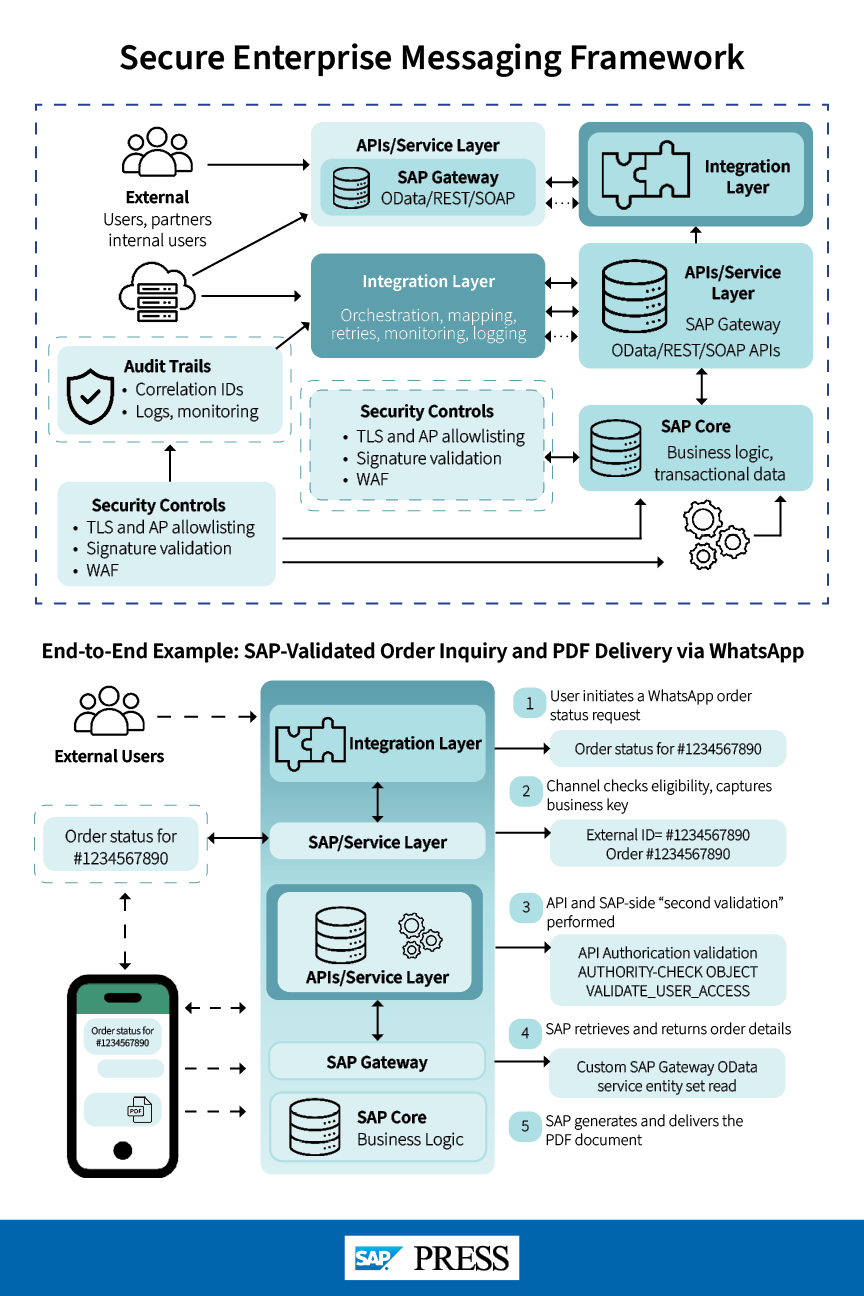
A secure WhatsApp-to-SAP integration typically includes the following features. First, it has an SAP core which serves as the record for transactional and master data. Second, it includes SAP APIs or services such as OData, REST, or SOAP which get exposed through SAP Gateway or SAP Business API. Third, it includes an integration layer through SAP Integration Suite for orchestration, routing, transformation, retries, monitoring, and logging. Fourth, messaging APIs, webhook events, template management, and conversation orchestration is handled via the WhatsApp/contact-center front end. Lastly, itis used by customers, partners, and internal teams.
There are a few architecture principles to keep in mind when designing this integration. It should be security-first, where SAP remains the final authority for transaction access and document retrieval. It should have least-privilege data exposure, meaning it returns only what the conversation needs. It should also be scalable: Use standard resilience patterns (timeouts, retries, and dead-letter handling) in the integration layer. Lastly, it should be auditable, carrying correlation IDs end-to-end and logging each step for traceability.
End-to-End Implementation Example (Order Details + PDF Delivery)
This section walks through a single scenario commonly requested in SAP landscapes: a user first requests sales order details/status and then an order PDF. The design uses a custom SAP Gateway OData service with an entity set for “order details/status” and media streaming for “PDF,” keeping data retrieval and document delivery within SAP while allowing the front end to manage the conversational experience.
Step 1: User Initiates the Request in WhatsApp
The user sends a message such as “Order status for 1234567890” or selects an order-status option from a guided menu. The WhatsApp provider/contact-center front end normalizes the intent (request type) and extracts the business key (sales order number).
Step 2: Channel Access Validation (Front End)
The front end validates that the user is eligible to use the chatbot channel (for example, opt-in and basic identity rules). This gate is important, but it is not sufficient by itself—SAP still needs to enforce transaction-level authorization before returning any business data.
Step 3: API Validation and SAP-Side “Second Validation” (Transaction-Level Authorization)
The integration calls SAP using secure API authentication (for example, OAuth 2.0). Once the request reaches SAP, the critical control is a “second validation” step performed inside SAP before any data or PDF is returned.
A proven approach is to do the following:
- Map the external user identifier (for example, the enterprise user ID or external user number passed from the front end) to an SAP identity representation (SAP user and/or business partner mapping maintained for customer/partner access and sales order access).
- Validate the requester’s relationship in the sales order using partner assignments on the sales document and/or customer relationships, and then enforce standard SAP authorization objects using standard BAPI validation for sales order and AUTHORITY-CHECK OBJECT (or a centralized VALIDATE_USER_ACCESS routine that wraps these checks).
- Centralizing the authorization logic is important for maintainability; the same validation should be reused for the “status/details” read and for “PDF download,” so the PDF path does not become an authorization bypass.
Step 4: Retrieve Order Details/Status (OData Entity Set)
Once authorized, SAP processes the order inquiry through an OData entity set read. In SAP S/4HANA, this is typically implemented by redefining the OData entity set GET_ENTITYSET method and reading from CDS views designed for chatbot consumption (consolidating order header/items/schedule lines and, where needed, delivery/billing references and business-friendly descriptions).
In older SAP ERP (ECC) patterns, teams may use a standard function module such as BAPISDORDER_GETDETAILEDLIST to retrieve order details and then shape the response to a minimal, chat-friendly payload.
Chatbot payloads often expose gaps that do not show up in traditional UI/reporting, such as missing descriptive texts, translation needs (reason codes/payment terms), or field-length constraints. Plan for these early, because they directly affect usability in a conversational channel.
Step 5: Generate and Deliver the Order PDF (Media Stream Via SAP Gateway)
If the user requests a PDF (for example, order confirmation), the integration calls a media endpoint that streams the PDF back. On SAP Gateway, this is commonly implemented by redefining /IWBEP/IF_MGW_APPL_SRV_RUNTIME~GET_STREAM.
A robust PDF path typically follows this sequence:
- Parse keys from the request (sales order number + requester identifier).
- Re-run the SAP-side authorization check (does not rely on the earlier status call).
- Determine output type and language using standard SAP output control runtime data (for example, NAST) and resolve the form via customizing (for example, TNAPR), so the chatbot channel aligns with enterprise output governance.
- Generate the PDF using the landscape’s output approach (Smart Forms or Adobe Forms). Common building blocks include SSF_FUNCTION_MODULE_NAME, form/print processing such as RV_DOCUMENT_PRINT_VIEW (where applicable), and conversion utilities such as CONVERT_OTF to produce an XSTRING.
- Return the PDF stream with MIME type application/pdf. The WhatsApp provider/contact-center front end delivers it to the user as an attachment (or, where policy requires, via a secure link pattern).
Step 6 (Optional): Invoice/E-Invoice PDF Delivery
Invoice PDF delivery uses the same pattern (entity set lookup + GET_STREAM delivery), with two practical considerations:
- Users may provide different identifiers (sales order number or billing document number). If an order has multiple billing documents, it can return a short list and prompt the user to select which invoice to send rather than guessing.
- Define a clear rule for cancelled and rebilled invoices, because it affects both the invoice selection list and what is eligible for download.
Core Functional Capabilities (Implementation-Driven)
A production-grade WhatsApp-to-SAP solution typically needs the following: identity mapping, SAP-native authorization enforcement, conversational workflows that reliably collect business keys, and secure document delivery using SAP output mechanisms. A practical division of responsibilities is this: keep conversation orchestration and experience logic in the front end/integration layer, and keep transaction entitlement and document generation within SAP.
Technical Implementation Guide (What to Build)
Put the following technology stack into place:
- SAP core: SAP ERP and/or SAP S/4HANA
- API layer: SAP Gateway OData service (custom) with entity sets plus media streaming for PDFs
- Integration middleware: Orchestration, mapping, retries, monitoring, and logging
- WhatsApp provider/contact-center front end: Webhooks, templates, and conversation routing
Then create these SAP artifacts to reference explicitly:
- Order details/status: Redefine the entity set GET_ENTITYSET handler and read from CDS views (SAP S/4HANA) or use a standard retrieval FM such as BAPISDORDER_GETDETAILEDLIST (SAP ECC), and then shape a minimal response.
- PDF streaming: Redefine /IWBEP/IF_MGW_APPL_SRV_RUNTIME~GET_STREAM for document delivery.
- Authorization: Implement centralized authorization validation using AUTHORITY-CHECK OBJECT (or a single validator method) and reuse it for both status and PDFs.
- Output control: Use NAST/TNAPR-driven output selection and form resolution; generate PDFs with Smart Forms/Adobe Forms runtime and produce an XSTRING for streaming.
Lessons Learned and Trade-Offs
Below are some things that were learned through performing this integration.
- Avoid long-term dependence on spreadsheets for mapping logic. If a spreadsheet defines transformation rules, migrate them into governed configuration or CDS logic so changes are tracked and transportable.
- Plan for translation and field-length constraints early. Conversational payloads expose missing texts and truncation issues quickly; address them as part of the API contract, not as a late UI fix.
- Design the invoice user journey explicitly. When multiple invoices exist, list and prompt; do not send a PDF until the second validation is complete.
Security & Compliance Design
Security is foundational to enterprise messaging integrations. Common controls include TLS across endpoints, webhook signature validation, IP allowlisting, and WAF at the edge. Within SAP, enforce SAP-native authorization and relationship checks, minimize payload attributes, and log access with correlation IDs for auditability.
Operational Monitoring
Instrument the solution to measure production behavior responsibly. Consider the following:
- End-to-end latency (WhatsApp inbound > SAP response > WhatsApp outbound)
- SAP API error rate and functional “not found” rate
- Authorization failure rate (often indicates mapping or partner data issues)
- PDF generation failure rate (output type/form resolution, language handling, form runtime)
- Volume and retry counts at the integration layer (queue/backpressure indicators)
Key Risks and Mitigation Strategies
Here are some risks to keep in mind when integrating SAP with any enterprise messaging system, as well as some mitigation strategies.
For unauthorized data exposure, mitigate with SAP-side second validation plus standard SAP authorization objects for orders and billing.
To avoid data leakage through documents, re-run authorizations on every PDF request; return controlled errors when invalid.
To keep webhooks from being abused, utilize signature validation, allowlisting, and WAF.
For invoice edge cases, create explicit rules for cancelled/rebilled documents and multiple invoices per order.
To help users during peak traffic hours, enable buffering, retries with dead-letter patterns, and horizontal scaling in middleware.
Conclusion
A secure SAP-to-WhatsApp integration modernizes how users retrieve order and billing information without weakening SAP governance. The most reusable pattern is straightforward: let the WhatsApp provider/contact-center front end manage the conversation, let the integration layer orchestrate, and let SAP enforce transaction entitlement and generate authoritative documents. By anchoring the design in SAP Gateway OData (entity sets + GET_STREAM), CDS-backed data models, and consistent authorization checks and validations, SAP teams can deliver conversational automation at scale with enterprise controls.
This post was originally published 3/2026.





Comments