

In this blog post, we'll explore the technical objects and BAdIs in SAP Document and Reporting Compliance.
The figure below shows a visual overview of the ABAP class map and the key BAdIs, as well as a summary table as to how these are used in country-/mandate-specific implementations.
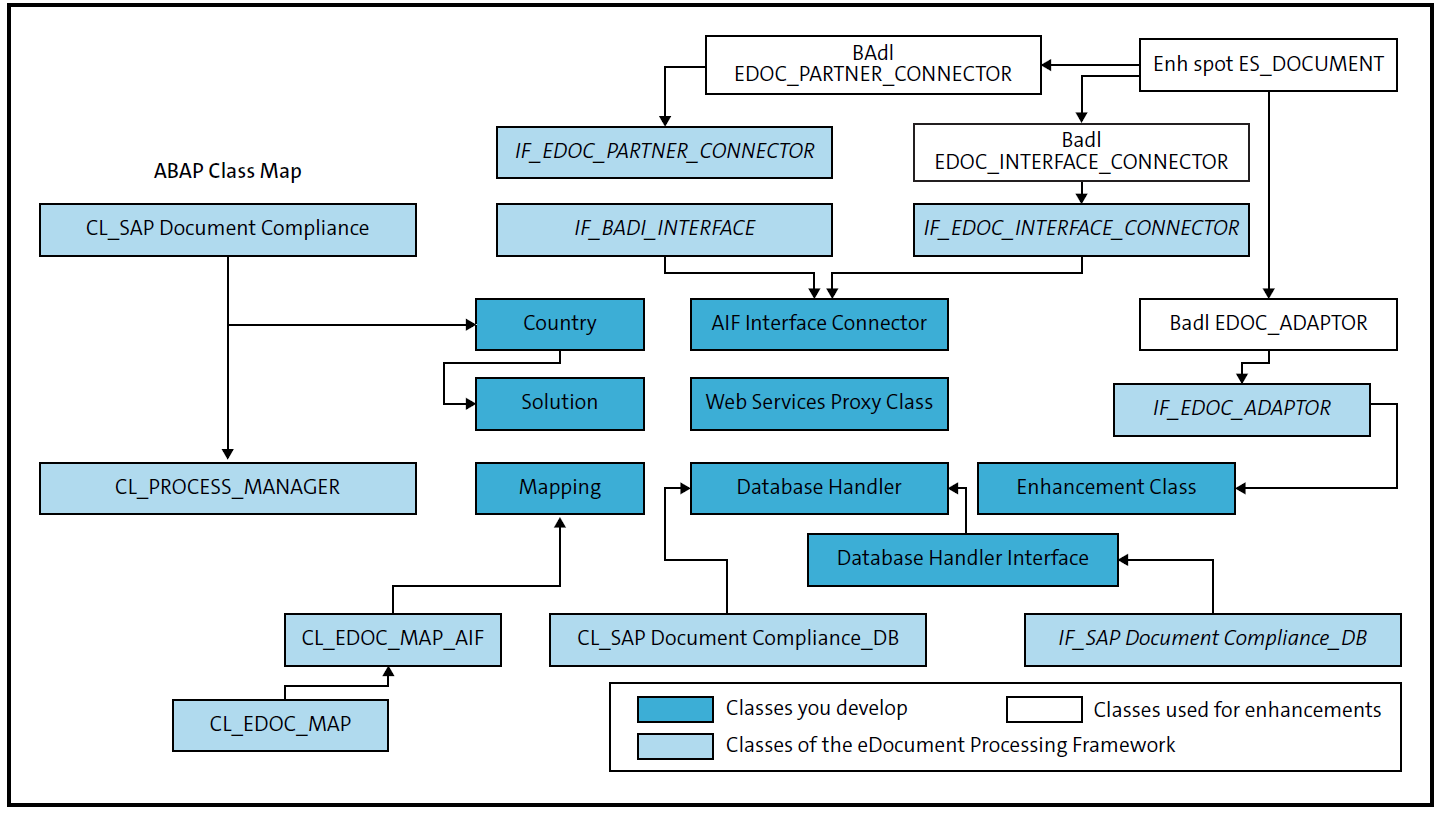
This is important because a large part of the business logic for SAP-delivered content is embedded in technical ABAP or SAP BTP objects. Understanding these objects becomes key when the processes don’t function as expected due to configuration issues, lack of information on how certain data points are mapped, gaps in the standard logic, and so on.
As you can see, there are two key sets of ABAP objects, as follows:
- Class CL_EDOCUMENT_[country code/mandate specifics] implements the process-specific logic. Additional logic may be triggered via factory classes, for example, CL_EDOC_FACTORY_[country code/mandate specifics].
- Class CL_EDO_MAP_[country code/mandate specifics] implements the mapping logic to produce the submission-ready format (e.g., payloads).
In the following sections, we’ll walk through some of the important technical objects used by SAP Document and Reporting Compliance as well as the key BAdIs you may consider implementing to meet individual requirements during an implementation.
Technical Objects
The following points explain how these technical objects (e.g., classes, tables, structures, etc.) are used in the SAP Document and Reporting Compliance framework and where they are referred to:
Country-Specific eDocument Class and its Link to the Country
- Table EDOCOUNTRYTCH, maintenance view EDOCOUNTRYTCH
- Class CL_EDOCUMENT_[country code] (subclass of CL_EDOCUMENT)
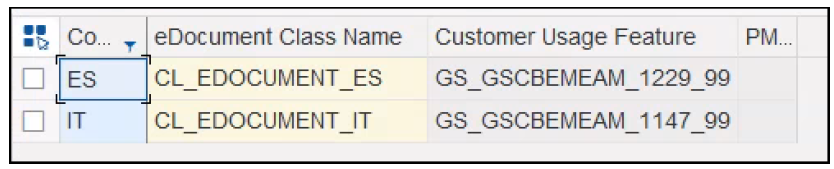
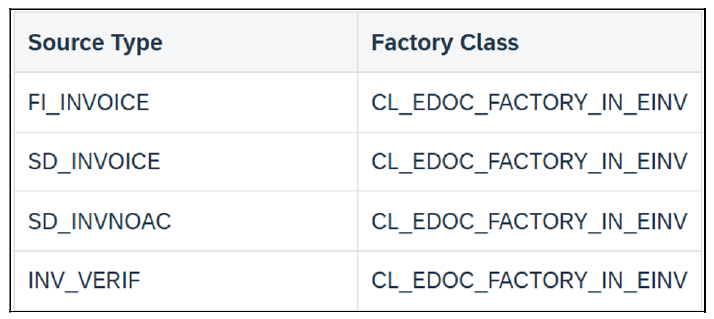
This implements the country-specific logic (steps, actions, etc.). If multiple mandates and scenarios may be applicable to a single country, additional eDocument instance creation can be triggered by registering additional factory classes in table EDOFACTORY, maintenance view EDOFACTORYV. Sample entries for India e-invoicing are shown here.
Tables Storing eDocument-Related Data by eDocument Unique ID
The following tables store process-specific data for a unique eDocument identifier (e.g., information provided by the response of the authority web service):
- Main Table EDOCUMENT
- Country-/mandate-specific tables follow the naming convention EDO[country code][document type, e.g., INV for outbound invoice].
eDocument Type Definition
- Table EDOTYPE, maintenance view EDOTYPEV
The assignment of eDocument types to the EDO[countrycode] tables from the previous
step, which store eDocument process–relevant data, can be found here.

Process Database Handler/Class
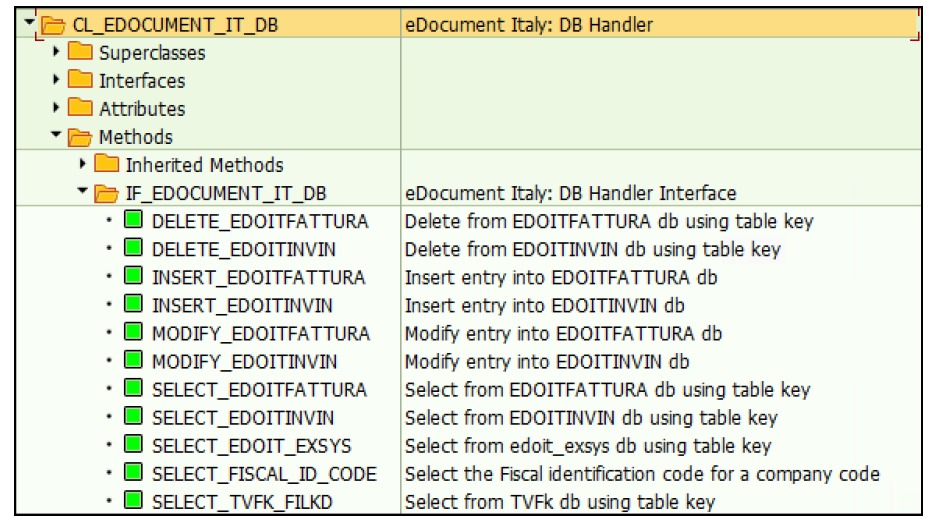
- Interface IF_EDOCUMENT_[country code]_DB
- Class CL_DOCUMENT_[country code]_DB (subclass of CL_EDOCUMENT_DB)
These objects handle the database operations for country-specific tables and functions (e.g., creation, update, and deletion of entries).
Define Structures for the Interfaces
- Structure EDO_[country code]_[document type], which corresponds to the document structure of the submission format (e.g., the structure may be ultimately transformed into an XML using techniques such as XSLT).
- Structure EDO_SRC_DATA_[source document type], which defines the structure for the SAP S/4HANA source documents such as sales invoices, financial accounting invoices, and so on.
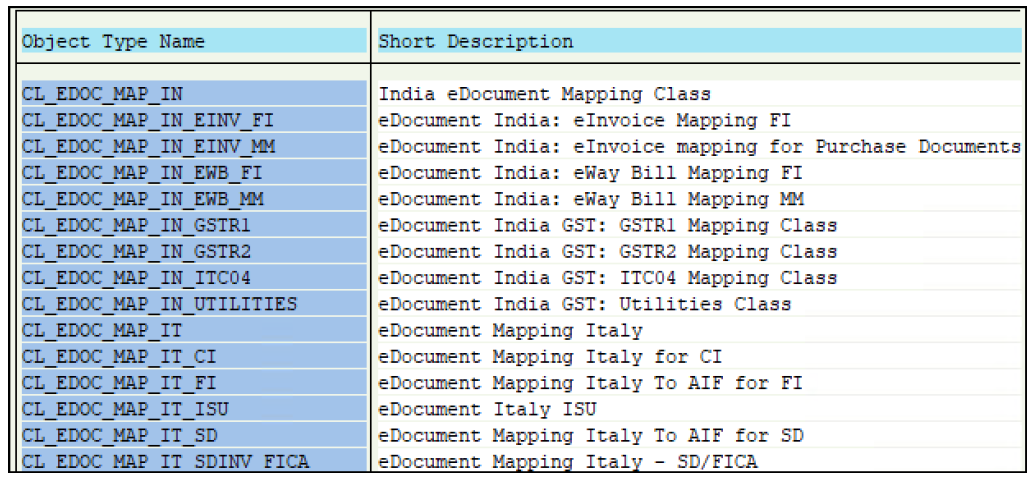
ABAP Mapping Class
- Class CL_EDOC_MAP_[country code/mandate specifics] (subclass of CL_EDOC_MAP_AIF).
This contains the main logic for mapping from source applications to the target country-/mandate-specific structure, including the execution of the SAP Application Interface Framework transformations.
Process Manager CConfiguration and Link to the eDocument Class
- Transaction SM34, view cluster EDOC_PROCMGR
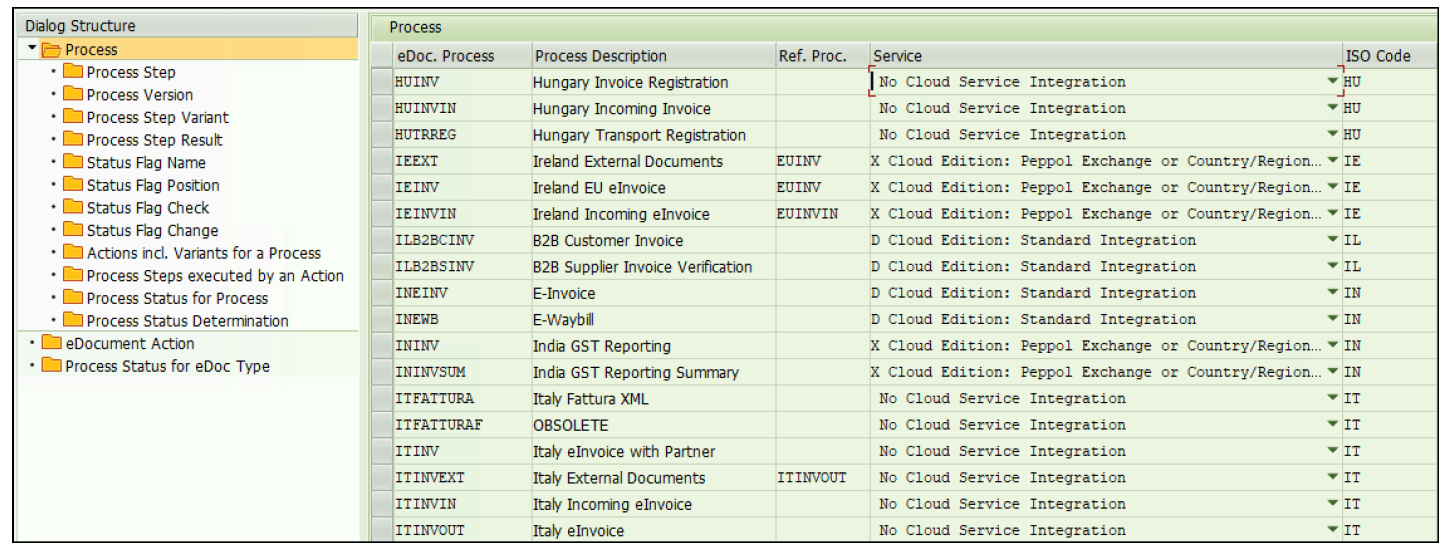
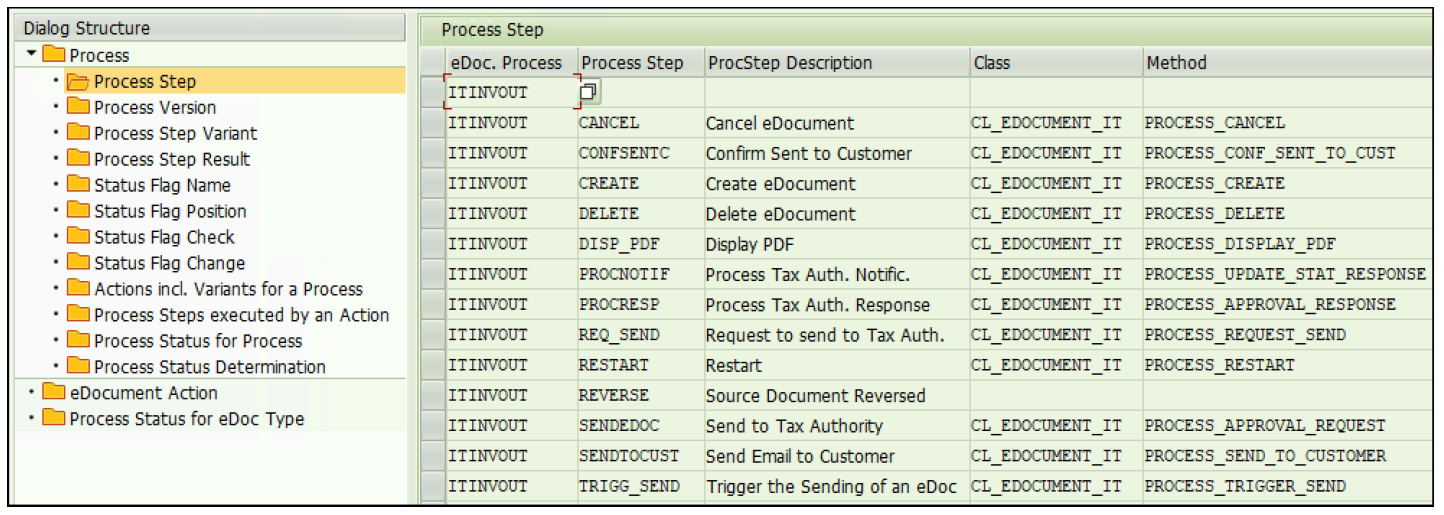
In this step, the process steps, actions, and other parameters are defined per process. A process generally refers to an electronic mandate; however, specific processes exist based on various characteristics such as the direction of the messaging (e.g., outbound invoices vs. inbound invoices) or type of document (e.g., delivery notes vs. invoices).
The link to the ABAP classes is defined where the steps are connected to the implemented class method of the eDocument handling class defined, such as CL_EDOCUMENT_[country code/mandate specifics], as shown in this figure.
ERP Source Type/eDocument Type Linking
In table/maintenance view EDOCOMPANYACTIV, the source types (sales invoices, financial accounting invoices, etc.) are activated by company code.
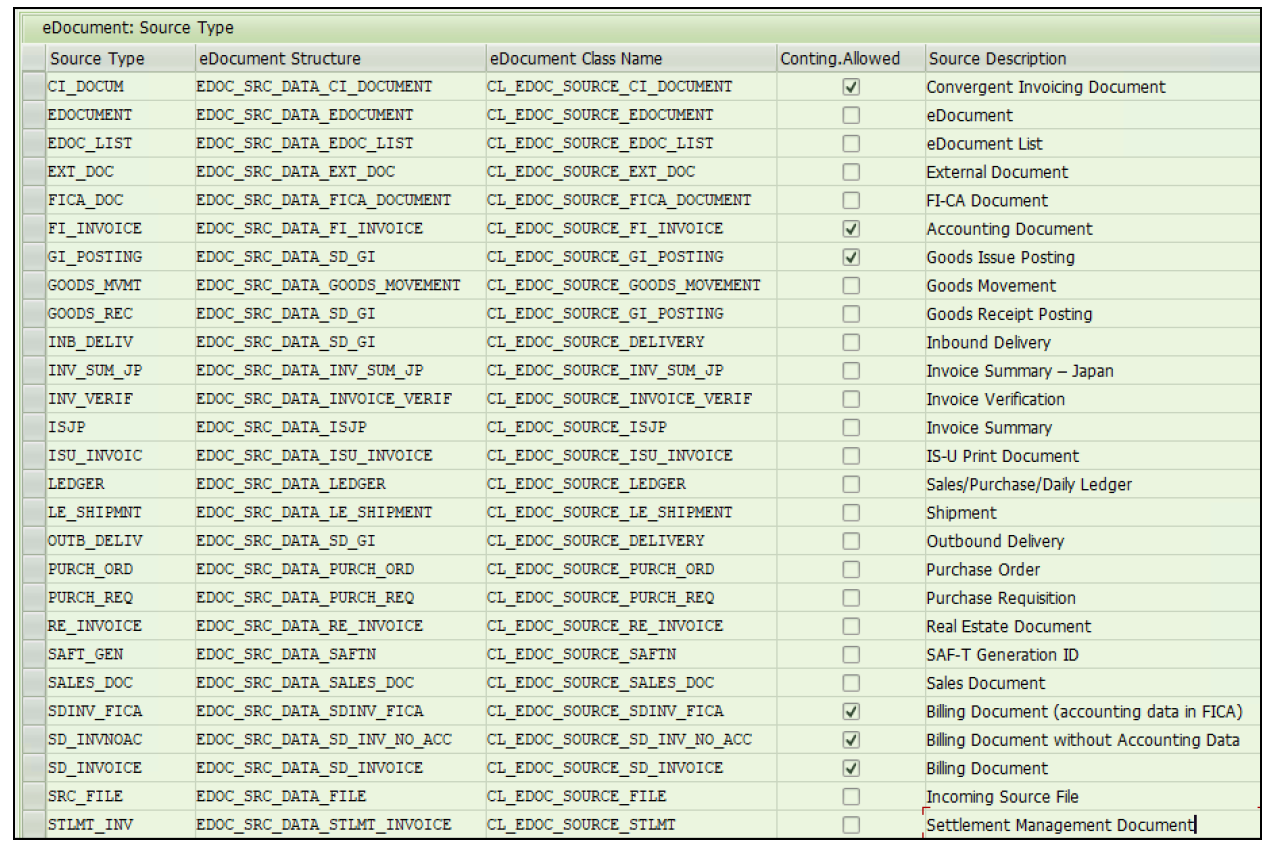
Table EDOSRCTYPE (maintenance view EDOSRCTYPEV) specifies the ERP source types and how these are fetched (ABAP class and the source structure).
The eDocument type defined in table EDOTYPE is associated with the source ERP documents and interface types (e.g., table T003EDOC for accounting documents, table TVFKEDOC for billing documents, and table EDOINTTYPE for the link to the interface type, each has a corresponding maintenance view, including the “V” suffix such as view T003EDOCV).
Implement the “Hook,” Which Links ERP Business Processes to the eDocument Framework
Lastly, we need hooks to trigger the eDocument creation process off the back of specific events in the SAP S/4HANA system.
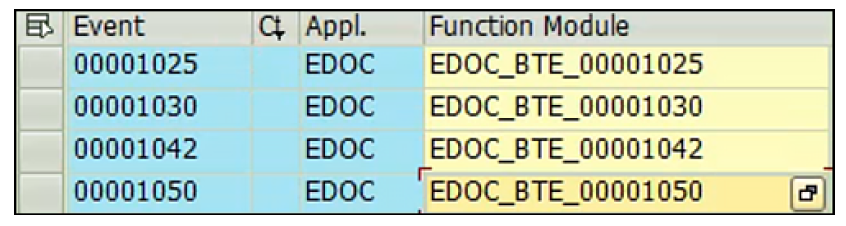
Examples include Business Transaction Events (BTEs) that are triggered after the financial accounting documents are posted (e.g., for outbound scenarios). These BTEs, along with their corresponding function modules, need to be assigned in Transaction FIBF. Other mandates such as incoming invoices may rely on different hooks or mechanisms for the creation of the eDocument transactions.
This figure shows which events are associated with which eDocument-specific hooks/function modules (as defined in Transaction FIBF).
Key Business Add-Ins
BAdIs provide key extensibility options when organizations need to adjust and extend the logic SAP delivers or create their own eDocument-related processes, for example, implementing a mandate that isn’t covered by the standard content/country version. Let’s look at some key BAdIs, as follows:
EDOC_INTERFACE_CONNECTOR
This BAdI allows for the enhancement of the logic for the interfacing aspects, for example, integrating the eDocuments with SAP Application Interface Framework.
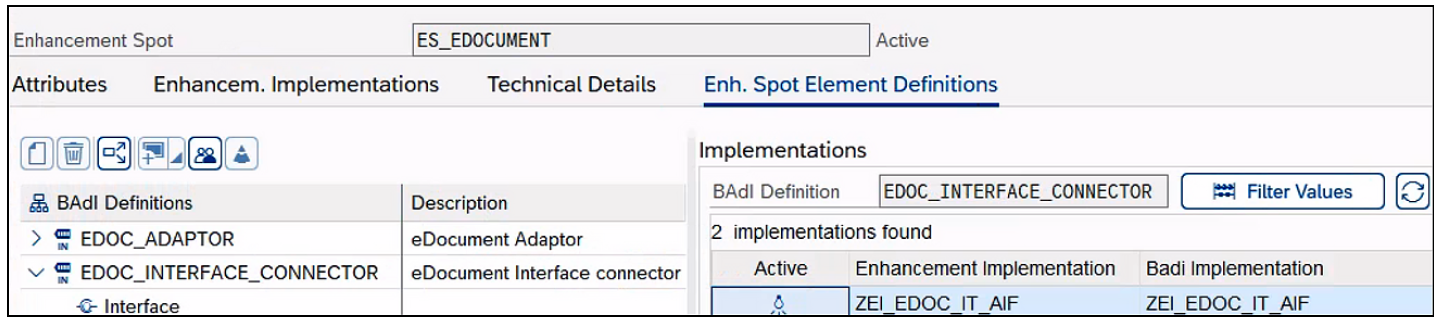
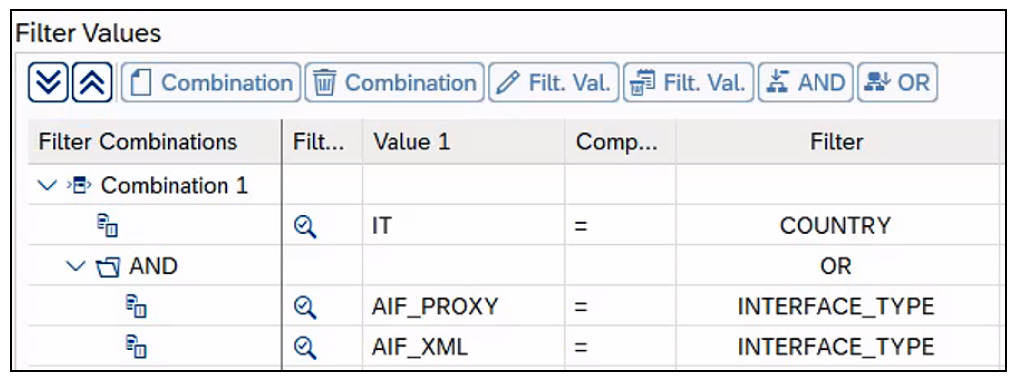
The BAdI is implemented with its specific business logic with the filters used to tie the implementation to the given country/electronic mandate, as shown in this figure.
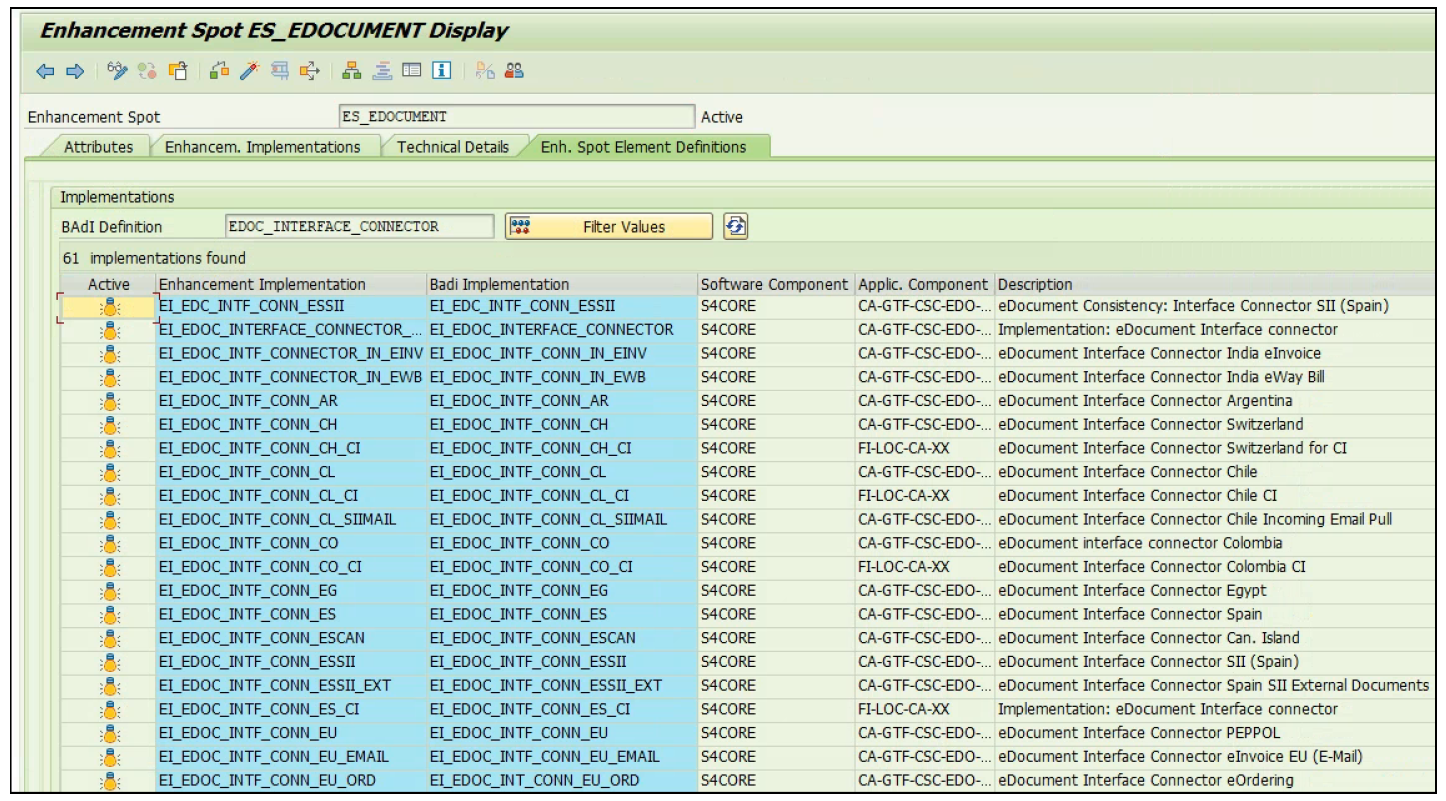
Each mandate will have its own implementation, and you can implement your own logic as well, as shown here.
EDOC_ADAPTOR
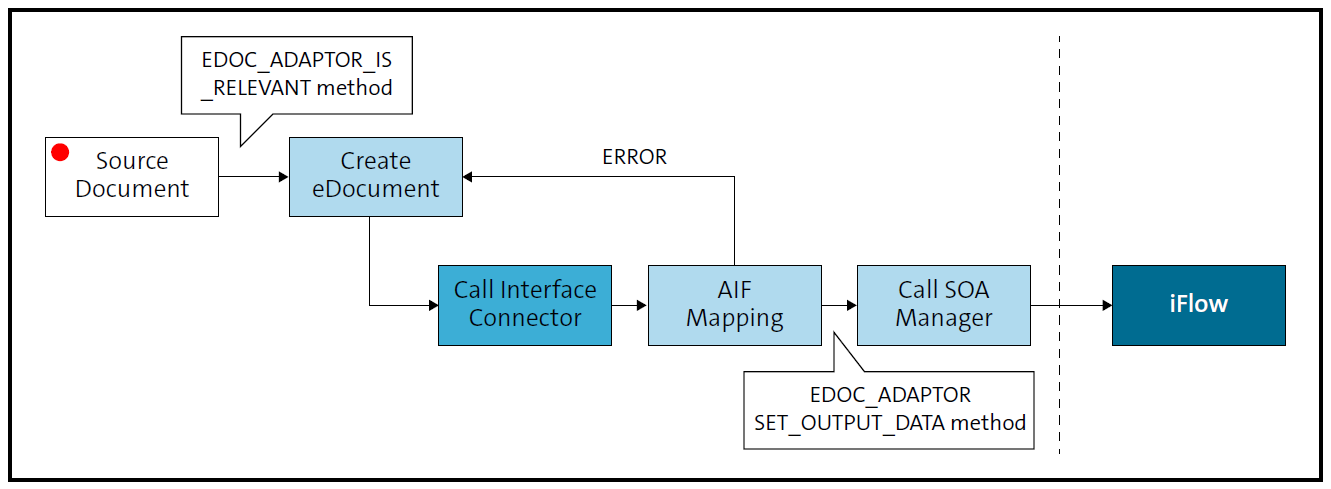
As shown in the figure below, this BAdI allows for eDocuments to be adjusted in the following ways, among others:
- Determining which source ERP documents are relevant for a given mandate (IS_RELEVANT method)
- Making XML content changes (SET_OUTPUT_DATA method)
- Adjusting the eDocument type determined by the standard configuration (CHANGE_EDOCUMENT_TYPE method)
- Adjusting number ranges (GET_VARIABLE_KEY method)
- Changing the rules around cancellations (RESTRICT_CANCEL method)
- Making PDF form layout changes (CHANGE_FORM method).
Using its filters, country-specific implementations can be added.
EDOC_PARTNER_CONNECTOR
This BAdI allows logic to be added for eDocuments to be sent on to external parties, such as business partners and customers. For example, this functionality enables eDocuments to be sent to customers in emails in Germany, including adding attachments.
EDOC_CUSTOM_FIELDS
This BAdI makes it possible to add custom fields to the EDOCUMENT table.
Learn more about SAP S/4HANA Finance here.
Editor’s note: This post has been adapted from a section of the book SAP Document and Reporting Compliance: The Comprehensive Guide for Finance and Tax by Genevieve Watson, Eliza Alberts-Muller, and Iain MacIntosh. Genevieve is an experienced tax ERP and transformation leader, and a Partner within Deloitte's Tax Technology Consulting team. Eliza is a Partner within Deloitte‘s Tax Technology Consulting team with close to 20 years of experience in (indirect) tax and tax technology gained both in industry and consulting. Iain is a Principal at Deloitte with more than 25 years of experience implementing SAP.
This post was originally published 11/2025.





Comments