

SAP Signavio, WalkMe, and SAP Build Work Zone may converge on the user's screen, but they sit in different governance regimes and serve different constituencies.
SAP Signavio is governed by the process owner community and answers the question “What should happen?” SAP Build Work Zone is governed by IT operations and answers the question “How does the user reach the screen where it happens?” WalkMe is governed by the WalkMe content manager and the same process owner community jointly, and it answers the question “How is the work performed once the user is there?” Alignment among the three is a structural commitment expressed on the data spine.
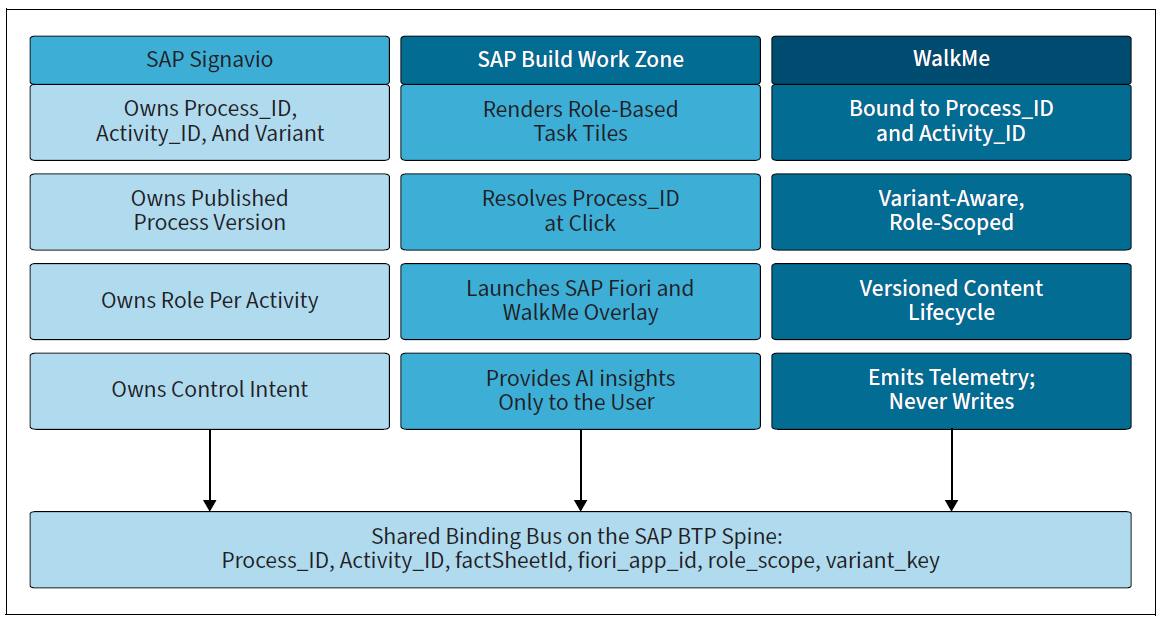
The figure below shows the three-way alignment as a single binding layer. Each tool publishes its responsibilities into the data spine using the same stable identifiers. SAP Signavio publishes Process_ID, Activity_ID, variant, role, and control intent. SAP Build Work Zone publishes the role-based tile assignments and the SAP Fiori app launches associated with them. WalkMe publishes the WALKME_ASSET_BINDING records that scope guidance to those same identifiers.
None of the three writes into the others; all three write into the data spine, and the data spine renders a coherent picture to anyone who queries it. Each tool publishes into a shared binding layer on the data spine using the same stable identifiers. The user experiences a single navigable surface.
SAP Signavio: The Authoritative Process Reference
Process owners maintain the L4 and L5 process models, including the mandatory execution attributes the data spine consumes: the Activity_Stable_ID, the Performing_Role, the System_Trigger, the App_Reference, the Control_Intent classification, the variant enumeration, and the lifecycle state. WalkMe is a downstream consumer of these attributes; it does not request changes to them.
When a WalkMe content manager discovers that an asset cannot be cleanly bound because the upstream Activity_Stable_ID is missing or because the variant enumeration does not include a needed value, the remediation path runs through SAP Signavio governance, not around it. The asset stays in Draft status until the upstream attribute is published. This is the same discipline imposed on SAP LeanIX-side bindings, and it has the same effect: It forces the modeling debt to be settled at the source rather than papered over downstream.
One SAP Signavio responsibility is specific to the WalkMe alignment. Process owners must classify each activity for adoption-content eligibility using a controlled list attribute named Guidance_Required. Three values are permitted. The value Required means the activity is sufficiently complex or risk-sensitive that a WalkMe asset is mandated; absence of a binding is reported as a defect by the validation layer. The value Optional means a WalkMe asset is permitted and welcomed but is not required. The value Prohibited means a WalkMe asset is forbidden, typically because the activity is internal to system processing and has no human-facing screen or the activity is so sensitive that out-of-system explanation could itself create a control risk. The attribute is part of the SAP Signavio extension contract and is consumed by the WalkMe authoring discipline.
SAP Build Work Zone: The Launch Surface
SAP Build Work Zone is the launch surface in the integrated landscape. It is what the user opens, what presents them with the task tiles their role makes available, and what carries them into the underlying SAP Fiori app where the work happens.
When a user clicks a task tile in SAP Build Work Zone, three identifiers flow downstream before the SAP Fiori app finishes loading. The Process_ID identifies the parent process the tile represents; this is the same identifier SAP Signavio publishes. The fiori_app_id identifies the screen being launched; this is what SAP Build Work Zone resolves from the tile manifest. The role_scope is derived from the user's authenticated session and the role assignments held in SAP Cloud Identity Services. These three identifiers reach the data spine through a process-aware execution service call, which returns the matching WALKME_ASSET_BINDING records. The user's experience is that the SAP Fiori app opens, and within a second or two the WalkMe overlay appears. The overlay is not loaded by the user, selected from a menu, or searched for; it is rendered because the binding resolved.
The SAP Build Work Zone responsibility in this alignment is to deliver the Process_ID and role_scope context to the data spine in a form the data spine can match. The tile manifest in SAP Build Work Zone carries the Process_ID and the fiori_app_id as first class properties; these are populated at tile-creation time from the same SAP Signavio extract. A tile whose Process_ID is missing or whose fiori_app_id does not resolve against the SAP Fiori library is flagged by the validation layer and is not promoted to Published in SAP Build Work Zone. As with SAP Signavio, the discipline runs at the boundary, not after the user encounters a broken tile.
WalkMe: The Guidance Surface
WalkMe's responsibility in the alignment is to render the matching assets and to emit telemetry for each render and each user interaction within the asset. The rendering is governed at three boundaries: the role_scope must be satisfied, the variant_key must match, and the binding_state must be Published. These three checks happen on the data spine, not in WalkMe; the WalkMe tenant receives a scoped list of asset_ids and renders only those. A WalkMe administrator who logs into the WalkMe console can see all assets in all binding states, but the rendering path itself honors only Published bindings whose scopes match the requesting session. This is a deliberate separation of editorial and runtime concerns.
Telemetry from WalkMe is emitted as a stream of events tagged with walkme_asset_id, Process_ID, Activity_ID, fiori_app_id, user principal (pseudonymized at the boundary), session_id, and event_type. The event_type values include asset_rendered, step_started, step_completed, step_skipped, hesitation_detected, drop_off, and survey_response. The events flow into the data spine through a single ingestion endpoint. The relevant fact is that the same identifiers that determine what is rendered also determine what is recorded. Adoption telemetry joins back to SAP Signavio activity definitions and SAP LeanIX application contexts through the same keys. The full closure of design, delivery, telemetry, and improvement—is operationalized through this single key discipline.
Joint Operating Cadence
Three governance regimes meet at the binding. They do not merge, but they cooperate on a cadence that mirrors the lifecycle of the underlying activity. That cadence is the practical answer to the question every transformation program eventually asks: who decides when an activity, an application, or an SAP Fiori app changes, and who acts on the decision.
When a process owner in SAP Signavio publishes a new version of an activity, the data spine's impact analysis service, walks the WALKME_ASSET_BINDING table and produces a list of affected bindings. Each affected binding has its binding_state set to in review and its owning WalkMe content manager is notified. The manager has a defined window (typically two weeks for non-control activities and five business days for control activities) to either revise the underlying asset, retire it, or request an extension.
If no action is taken in the window, the binding is auto-deprecated; the asset continues to render with a deprecation banner to existing users, but no new users see it. The intent of auto-deprecation is not punitive; it prevents stale guidance from becoming a permanent fixture due to inaction.
When an IT operations team in SAP LeanIX retires an application (meaning the lifecycle phase transitions from active to phase-out), the same impact analysis service walks the binding table and identifies WALKME_ASSET_BINDING records that reference the retired factSheetId. These bindings are placed in review automatically and their owning manager is notified. The manager must either reauthor the asset against the successor application or retire the asset. The discipline is identical to the SAP Signavio path; the trigger is different, but the operating model is the same.
When a WalkMe content manager initiates a content change on their own initiative—such as a clarification, typo fix, or regulatory update—the change is authored in draft, submitted for approval and promoted to Published without disturbing SAP Signavio or SAP LeanIX. The cadence here is one-way: WalkMe-initiated changes do not propagate upstream. If the change reveals that the underlying activity has shifted in a way that warrants an SAP Signavio update, the manager opens a change request through SAP Signavio governance. This is the same discipline a controller would apply if they discovered during the monthly close that a journal-entry convention had drifted from the documented policy. The close would be finished using the current policy, the policy gap would be documented, and the policy would be updated through the correct governance channel. WalkMe content drift never silently rewrites the SAP Signavio process.
Editor’s note: This post has been adapted from a section of the book Integrating Architecture, Processes, and AI on SAP BTP: Designing an AI-Ready Execution Layer Using SAP Signavio, SAP LeanIX, and WalkMe by Kumar Piraviperumal. Kumar has worked with SAP technologies since 1997 and leads a global SAP business transformation practice at Cognitus, spanning more than 19 countries, where he sets architecture standards, delivery governance, and execution models for large S/4HANA programs. His experience is concentrated in utilities, automotive, and IT services, covering global rollouts, regulatory-driven change, and post-merger integration. He has written for SAPinsider magazine, taught courses through SAP University Alliances and SAP Education Services, and speaks regularly at SAPPHIRE, SAP TechEd, and SAPinsider events. His current focus is execution-grade transformation and the responsible application of AI in SAP environments.
This post was originally published 8/2026.


.jpg?height=600&name=SAP%20Signavio%20Q&A%20Your%20Questions%20Answered%20by%20SAP%20Experts%20(2).jpg)

Comments