

Supply chain management requires constant refinement and adjustment of the company’s business processes. If this isn’t done, the supply chain isn’t operated at an optimal level, and the operating profit is reduced.
In this post, we’ll introduce the optimization cycle and discuss each step in detail.
Optimization Schema
This figure depicts the optimization schema we’ll use.
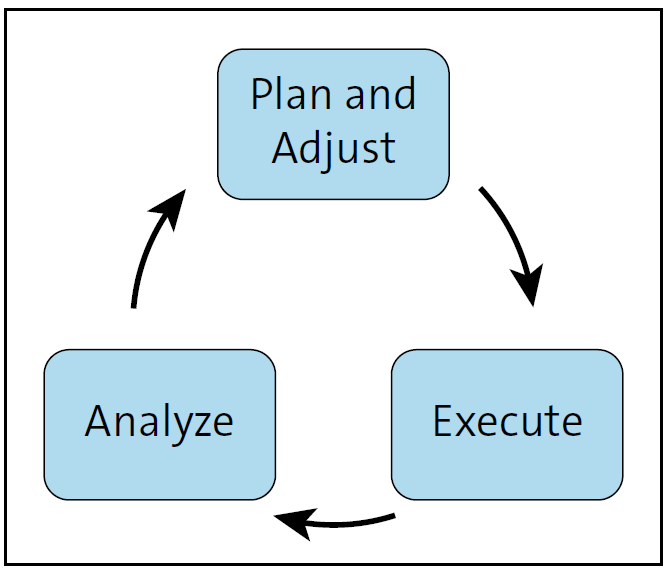
The three steps are detailed in the following sections. In general, the schema’s steps can be found in various project management or product management optimization strategies such as lean production, continuous improvement process, or Scrum. It entails a planning step, an execution step, and an analysis step. Each step is the input of its successor. The optimization cycle time is dependent on various factors, such as the following:
- Type of product
- Involved business process
- Stability of the environment
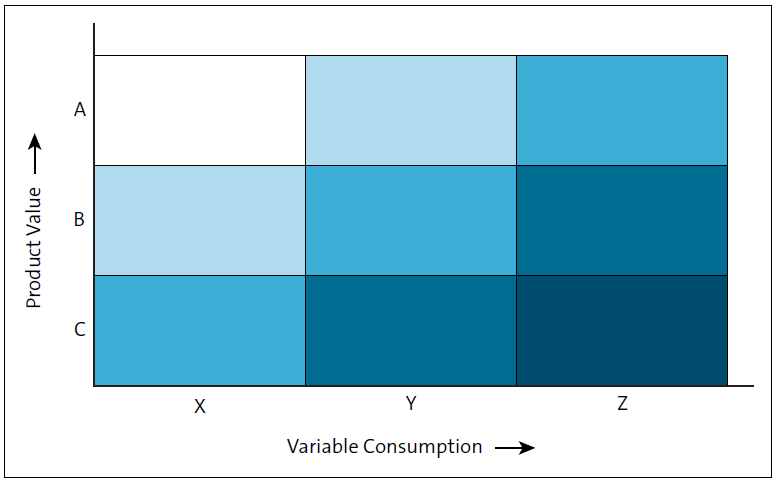
Usually, the higher the uncertainty, the faster the cycle time. It’s quite common to categorize products according to criteria such as contribution to operating profit and/or product value. This is often referred to as ABC analysis or ABC/XYZ analysis. The categories are also used to plan the optimization cycle time (see figure below). A matrix, as shown, helps you focus your optimization planning. Essentially, it clusters your inventory to help you focus on changes that have a significant impact on your company’s overall performance.
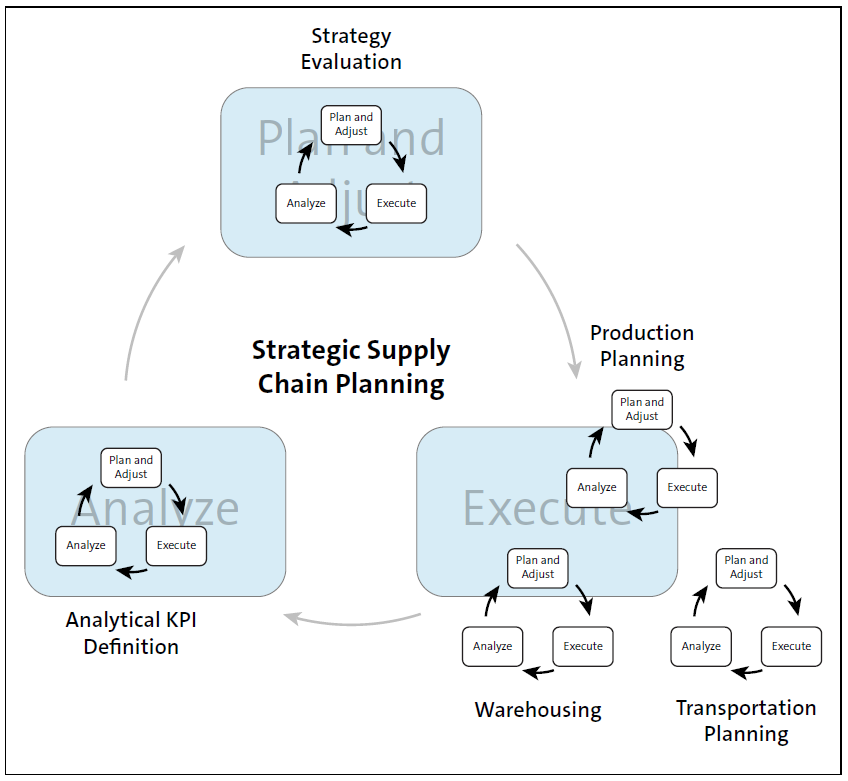
When looking back at the first figure, you may wonder what level of detail the optimization cycle is about. Basically, this idea isn’t linked to any specific level of detail. It can be used in strategic supply chain planning as well as in optimizing the goods receipt process of a warehouse. If you look at the supply chain process of your company, you’ll ideally find something like this.
Note: During optimization, you focus on high value/high profit generating products (A products). B and C products are taken into account with the lower frequency.
The previous figure shows that there are various levels on which you can execute the optimization cycle:
- Strategic enterprise level (defining KPIs or shaping the planning strategy)
- Division or subdivision level (optimizing subprocesses, such as production planning, warehousing, or transportation planning)
- Single loading point, storage location, or material level (not shown)
Plan and Adjust
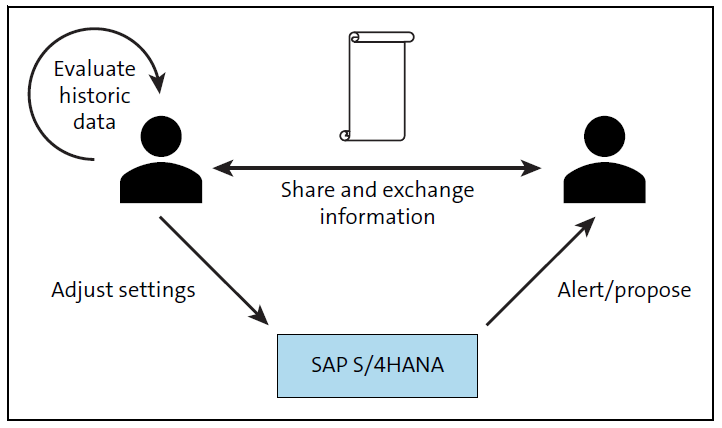
During the plan and adjust step, you typically share information and discuss the impact on the business. The system provides automatic or semiautomatic solution proposals. Your input is the analysis of the past and you target the future.
The next figure shows that the essential part of planning is sharing knowledge, looking at historic figures, and considering the system proposals to adjust the system settings.
Execute
During the execute step, you typically run your daily tasks, such as monitoring business processes, detecting and correcting plan deviations, and dealing with all planned and unplanned tasks in your daily work schedule. SAP S/4HANA supports your daily work with a variety of role-based monitoring tools. Additionally, you can personalize your own KPI-based monitoring apps within your SAP Fiori launchpad. There are role-based SAP Fiori apps used to collect worklists based on the end user’s responsibility. Based on the pyramid approach, SAP Fiori apps offer quick actions for the most frequently required tasks and highly powerful transactions to solve extreme cases.
The next figure depicts the sequence of SAP Fiori apps called by an end user in an SAP S/4HANA system. SAP Fiori apps guide end users seamlessly until they can complete their daily tasks. The role concept supports the end user by only offering the features and functions required for this specific role. Therefore, SAP Fiori apps greatly enhance end user productivity in an SAP S/4HANA system. In the end, you strive to focus on high value generating tasks and let the system do the routine work.
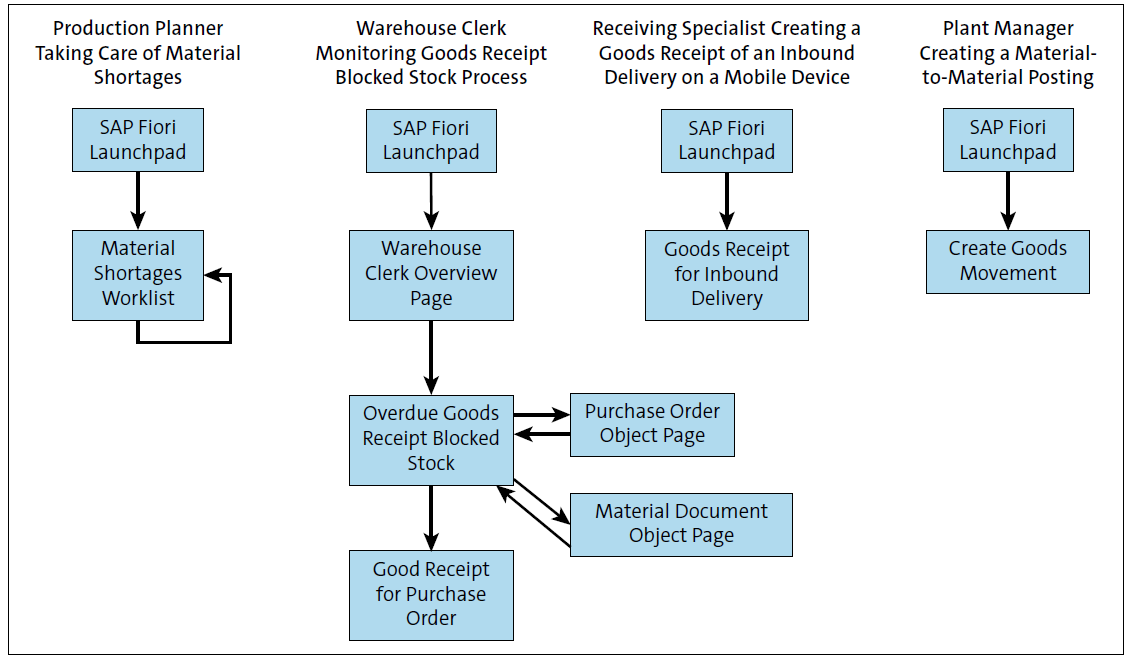
Let’s break down the examples shown in the figure:
- For a production planner taking care of a material shortage, the Material Shortage Monitoring app (F0247) provides alerts for upcoming shortages and automatically creates a solution proposal.
- For a warehouse clerk monitoring goods receipt blocked stock processes, the Overview page (F2416) alerts them of any stock locked up in goods receipt blocked stock and directs them to the monitoring application supporting a resolution.
- For a receiving specialist creating a goods receipt of an inbound delivery on a mobile device, the Goods Receipt for Inbound Delivery app (F2502) leads them to a mobilized SAP Fiori app supporting in-app bar code scanning.
- For a plant manager creating a material-to-material posting, the Create Goods Movement app (Transaction MIGO) offers an expert mode of all material document posting configured in the system.
Analyze
During the analyze step, end users check and evaluate current and historic data to draw conclusions for the next plan and adjust step. This figure displays different kinds of analytical
SAP Fiori apps and their intended usage.
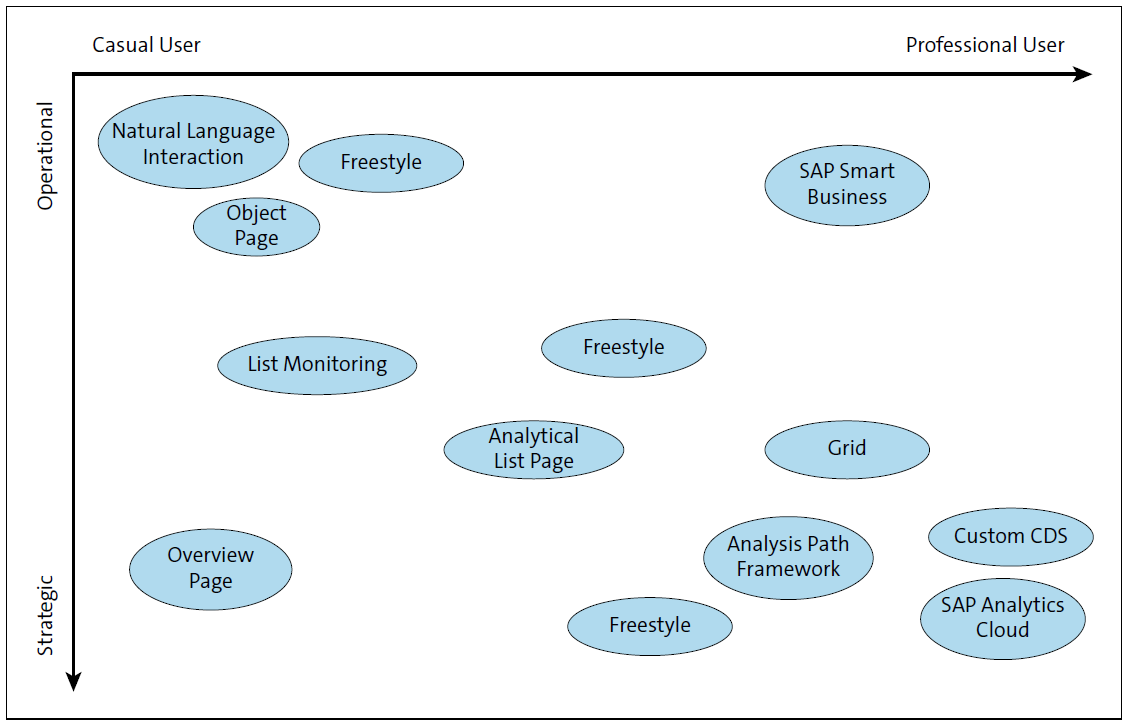
It’s important to understand that the user category on the x-axis depends on the business context of the end user. A sales operator is a professional user for any analytical sales application, but merely a casual user for an inventory application.
The y-axis defines the analytic capabilities of the SAP Fiori app, which is normally proportional to its ease of use. The natural language interaction (NLI) will support the casual user for operational analysis. SAP Analytics Cloud and custom core data services (CDS) views will support the professional user for strategic reporting. Most of the analytic SAP Fiori apps follow certain patterns; however, there may be freestyle apps in all kinds of categories. What all analytical SAP Fiori apps have in common is that the analysis is done in real time, that most of them are extensible, and that they are role based. Some analytical KPIs are even integrated into predominant transactional SAP Fiori apps. Results of any analysis can be shared with the collaboration tools mentioned previously.
Conclusion
Inventory optimization is not a one-time project but an ongoing discipline, and SAP S/4HANA is purpose-built to support every phase of the cycle. Through intelligent planning proposals, role-based SAP Fiori apps that streamline daily execution, and real-time embedded analytics, the system empowers organizations to continuously refine their supply chain performance at any level of detail. Combined with ABC/XYZ classification to focus effort where it matters most, companies can move toward a smarter collaboration between people and technology—turning continuous improvement from a periodic initiative into a core part of how the business operates.
Editor’s note: This post has been adapted from a section of the book Inventory Management with SAP S/4HANA by Bernd Roedel and Johannes Esser. Bernd is chief development architect within a central architecture team in the area of supply chain management (SCM) core logistics, where he has supported SAP S/4HANA development for the last ten years. Johannes joined SAP in 2002 and is a development manager in SAP development and a certified Scrum master.
This post was originally published 4/2026.




Comments