

Designing a clear, scalable account structure is one of the most important foundational decisions you’ll make when working with SAP Business Technology Platform (SAP BTP).
The way you organize global accounts, directories, and subaccounts directly affects governance, security, cost transparency, development workflows, and long-term scalability. In this post, we’ll walk through SAP’s recommended account models and explain how global accounts, directories, and subaccounts work together.
Structure of an Account Model
The hierarchical structure between global accounts, directories, and subaccounts allows you to define an account model that precisely matches your business and development requirements. Once you have signed your contract with SAP, you will receive the access data for your global account. This global account is the implementation of your commercial contract with SAP; you will use it to manage the resources and authorizations for your development projects. You will also receive one invoice for all consumed resources per global account.
To develop and deploy applications, consume services, and subscribe to applications provided by SAP, you need to create subaccounts. You can create any number of subaccounts in any environment and region. For example, if you are based in Germany, you can create subaccounts in different regions, such as Europe, the United States, or Japan, to support the customers who use your applications. Subaccounts are independent of each other, which means that each subaccount enables its own entitlement and user management. You can configure a separate identity provider for end users for each subaccount. If you have many subaccounts, you can use directories, which group subaccounts and/or further subdirectories, to keep track of them and make administration easier. You can use directories to manage permissions or users for entire groups of subaccounts. You can also use directories to distribute the resources assigned to the global account to its subordinate subaccounts.
Scalable Account Structure
SAP recommends building an account structure that can be easily scaled as your organization grows or additional projects are added. That is, you should start with only subaccounts and add directories to group these subaccounts as needed.
How many subaccounts and directories you create and for what purpose depends on your organizational structure and your use case. In general, SAP recommends using subaccounts for a multilevel development process in which you distinguish among a subaccount for development, one for testing, and one for production.
The development subaccount is intended for development purposes and for testing individual increments in the cloud. The test subaccount can be used to carry out integration tests and tests in a production-like environment before they are made publicly available, to ensure quality. In companies where DevOps is highly developed, this subaccount is also used for production applications as the tests take place in the development subaccount. You create the production subaccount for production applications.
Other typical reasons for creating subaccounts include the following:
- Separating development scenarios and projects for easier configuration—for example, with regard to access restrictions
- Separating the work of different development teams
- Restricting access to applications and their administration—for example, by setting up highly secure subaccounts with restricted access or by creating separate subaccounts for connectivity with your various backend systems
- Sharing an SAP HANA cloud database in a subaccount with similar projects that are managed in other subaccounts
When creating different subaccounts, keep the following considerations in mind:
- Connectivity to on-premise systems must be set up separately for each subaccount, which means more work for your platform engineering team. However, it may be easier for you to switch off all integration paths for a project if you have maintained them all in a subaccount. This also allows you to control which application uses which on-premise connections.
- When selecting a region for your subaccount, you should ensure that the region is close to the geographical location of your customers to reduce network latency. In enhancement scenarios, you should choose a region that is close to the systems involved. When selecting a region, also consider all legal requirements and load distribution.
- If your SAP S/4HANA clients need to be separated for legal or regulatory reasons (e.g., to separate the subsidiaries of a company), use different subaccounts for their extensions.
- If the DevOps or application operating teams within a subaccount are completely separate, you should set up separate subaccounts for them for better maintainability.
Although creating a multistage development environment is a good idea in any case, there are some Cloud Foundry–specific considerations that you should keep in mind.
You can use both subaccounts and spaces to develop applications and use services. You therefore need to decide whether you will create different subaccounts or spaces within a subaccount, for example, to set up a multistage development environment.
Data Access Separation at the Subaccount Level
Think of a subaccount as a tenant: Data access and data visibility are separated at the subaccount level, not at the application or Cloud Foundry space level. Remember that services used by every application within a subaccount collect messages from all those services. If you do not want these to be visible across applications, then you need to create different subaccounts.
In general, we recommend creating different subaccounts for a multitier development environment. This allows for dedicated user management between the different tiers, as well as dedicated data management. You can then create a separate scope for each application, extension, solution, or any other project within these subaccounts if you don't need separate user management for these applications and projects. You can only monitor the consumption of resources in your global account for each subaccount, directory, or Cloud Foundry space, not per application. To monitor the resources consumed by a specific project, department, or application, create a dedicated subaccount, directory, or space for it. Exact billing is only possible for global accounts. For the usage-based model, you can calculate the costs after use, but bear in mind that this is only an approximation.
As mentioned earlier, SAP presents the account model with subaccounts and the account model with directories and subaccounts as best practice in the SAP BTP documentation.
Account Model with Subaccounts
With a separate account landscape for each functional area, you can use multiple instances of the same SaaS subscription (e.g., in case you need to keep data or user access separate). You can see these account landscapes in the figure below for the HR and sales areas.
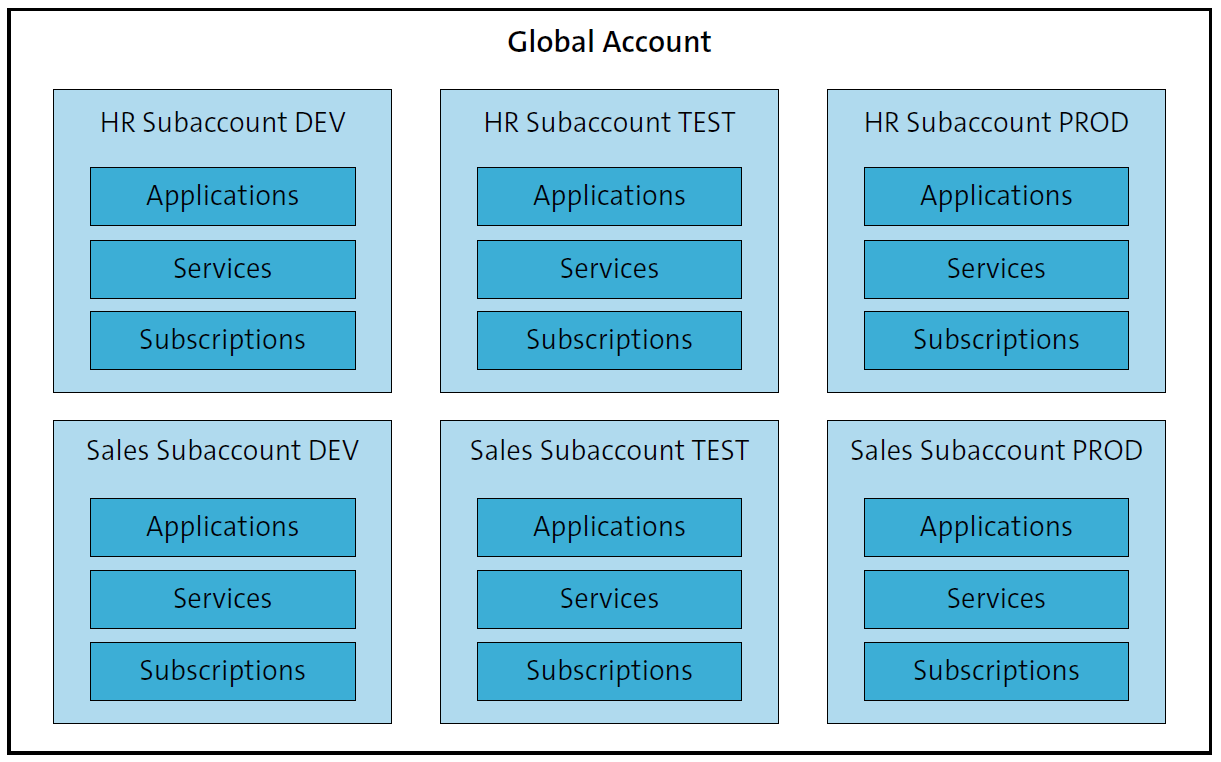
For example, an internal identity provider would be used for HR subaccounts, while an external identity provider could be used for public or external scenarios. This account model allows you to distribute the administration of the subaccounts across several teams, which makes it easy to scale as the number of cloud projects grows, while keeping maintenance and governance manageable. If possible, you should assign a colleague to be responsible for each group of three subaccounts—that is, each account landscape. An SaaS application can only be used once within a subaccount. So if each functional area has its own subaccount (for development, test, and production), you will not encounter any restrictions when using the same SaaS offering in different projects. In the Cloud Foundry environment, however, you can divide different projects into different areas within a subaccount. This model can easily be expanded later to use directories as additional structuring elements.
Account Model with Directories and Subaccounts
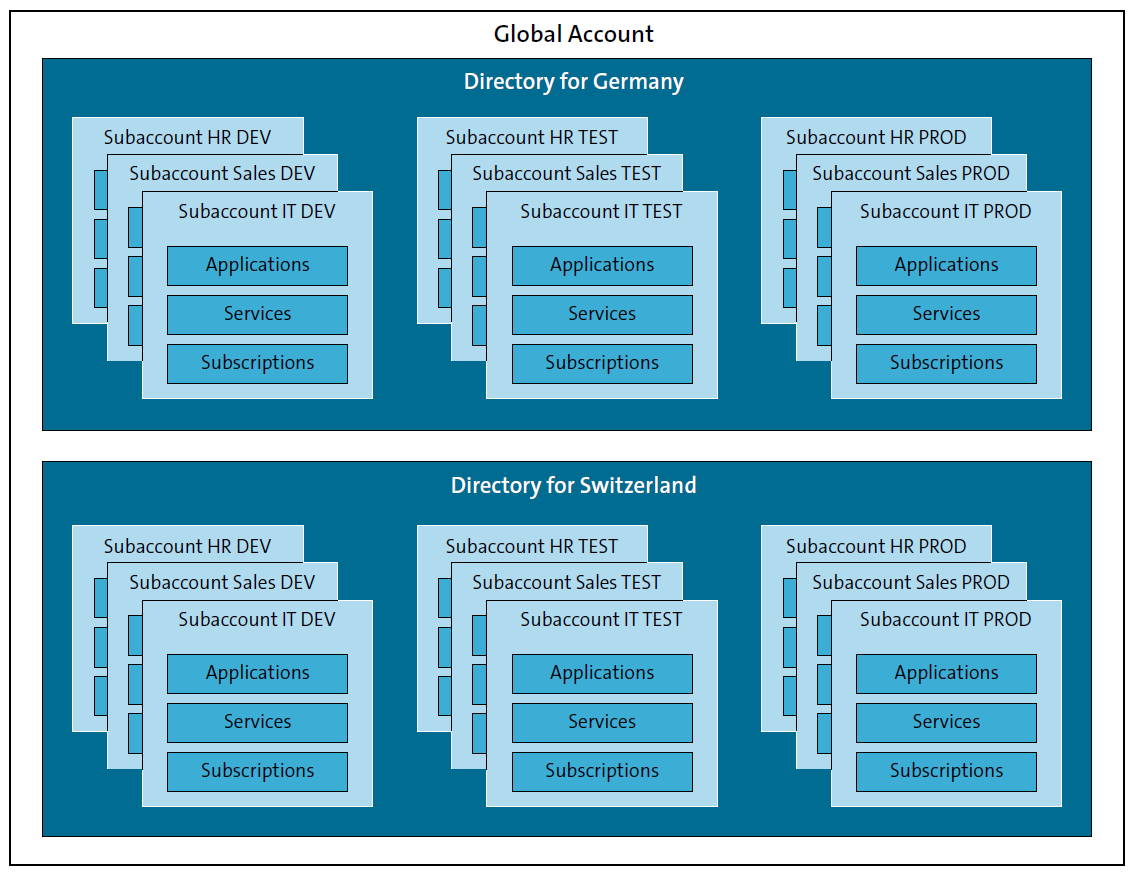
Not only can you structure your global account into multiple subaccounts, you can also combine individual subaccounts into directories in order to manage, operate, and analyze these groups of subaccounts together. A global account can contain up to five levels of directories, each of which can contain a subaccount. The following are some possible reasons for creating directories to make managing your subaccounts easier:
- Administrative reasons: Structure your global account according to responsibilities within your organization. For example, give each branch office, department, or LOB its own directory.
- Billing purposes: Structure your global account into directories for billing purposes.
- Geographic separation: Group subaccounts based on geographic location to manage different local regulations or to improve network performance for groups located in common sites.
- Business scenario: Group subaccounts by business scenario or other business requirement. This enables you to control each business solution separately.
- Resource constraints: Use the directory structure to control access to resources and limit usage by creating separate usage and cost reports, or to define usage restrictions, give critical directories more resources, or enable different monitoring per directory. You can also structure the subaccounts according to usage restrictions in different landscapes.
- Technical reasons: Structure directories and subaccounts according to technical restrictions and then add labels for virtual grouping or vice versa.
These approaches can be categorized into three distinct models based on functional areas, geographic regions, and subsidiaries, as outlined ahead.
Directories Per Functional Area
In this account model, each functional area uses its own directory. Within each of these directories, three subaccounts (for development, test, and production) are created (see figure below). For each directory, the functional area can use its own identity provider and manage its permissions. In addition, you can use labels—for example, to denote the person responsible, the cost center, or other aspects that you need for later reports.

Directories Per Geographic Area
In this account model, you create a directory for each geographic area. In the figure below, we show this using the example of the Europe, Middle East, and Africa (EMEA) region, and the Americas (AMER) region. There could possibly be a further distinction between North and South America. In addition, there is the Asia Pacific and Japan (APJ) region. You can also use labels at this point to describe the subaccounts in more detail.

Directories Per Subsidiary
In this account model, you create a directory for each subsidiary of your company (see below). Again, you can use labels to add information about cost centers or responsible persons, for example.
Conclusion
A well-designed SAP BTP account model provides far more than administrative order—it enables secure development, clean separation of responsibilities, predictable scaling, and meaningful cost control. By thoughtfully combining global accounts, subaccounts, and directories, you can create a structure that supports your development lifecycle, regional needs, functional areas, and regulatory constraints without unnecessary complexity.
SAP’s best-practice models, whether based on functional areas, geographic regions, or subsidiaries, offer flexible starting points that can evolve as your organization grows. The key is to begin with a simple subaccount structure, expand with directories only when needed, and always align technical boundaries with real business and operational requirements. With the right foundation in place, SAP BTP becomes significantly easier to manage, govern, and scale over time.
Learn SAP BTP in Our Rheinwerk Course!
What is SAP Business Technology Platform and what can it do? Get all the information you need in this course. Take a tour of the platform’s tools and services for development, integration, analytics, data management, and more. Learn directly from the experts and see SAP BTP in action with practical demos! Get access to course recordings by clicking the banner below.

Editor’s note: This post has been adapted from a section of the book Configuring SAP Business Technology Platform: The Practical Guide for Administrators by Martin Koch and Siegfried Zeilinger. Martin is the managing director of CloudDNA GmbH, an SAP partner in Austria. Siegfried is a freelancer and managing director of a small management consultancy.
This post was originally published 12/2025.




Comments