

In high-volume SAP environments, results analysis is not just a period-end accounting activity, but a daily operational control mechanism.
Yet many organizations discover that the standard execution model for transaction KKAK was never designed for the scale and transaction intensity of modern contract-driven businesses.
This post aims to guide SAP finance experts in implementing a game-changing solution to a common performance bottleneck. While the technical steps are straightforward, this guide is designed to help you spearhead the project, potentially in collaboration with an ABAP developer if you choose not to execute the technical components alone. By bridging the gap between functional requirement and technical execution, you can achieve a high-performance results analysis (RA) cycle that keeps the clean core intact.
The Business Problem: Daily Results Analysis at Scale
In many contracting- and service-oriented organizations, every job is represented as a contract in SAP. These companies often operate across dozens or even hundreds of branches nationwide, with new contracts created daily—often exceeding a thousand per day. The operational footprint is large, distributed, and continuously changing. In such environments, financial visibility cannot wait until period-end.
Why Must Companies Run Results Analysis (RA) Daily?
Running results analysis daily is not a luxury, but an operational necessity.
- Work in progress (WIP) visibility: Without daily RA, finance teams cannot determine what value has been earned but not yet billed. This directly impacts billing readiness, cash-flow forecasting, and revenue timing.
- Cost of sales (COS) and project health: RA is the foundation for recognizing costs against revenue. Without up-to-date cost of sales, organizations lose visibility into project profitability, margin erosion, and early warning signals on underperforming contracts.
- Month-end is too late: Waiting until period-end to assess financial reality creates a significant blind spot for the organization. Financial and operational issues are often identified only after material damage has already occurred, leaving little room for remediation. Project overruns can remain hidden for weeks, allowing cost escalation and margin erosion to compound unnoticed. By the time these issues surface at month-end, operational teams have already lost the opportunity to take corrective action, adjust execution strategies, or engage proactively with stakeholders. In high-volume, fast-moving contract environments, this delayed visibility is especially harmful. Daily financial insight provides a meaningful and actionable health check that enables timely decision-making and effective financial control.
Why Standard KKAK Becomes Infeasible at Scale
SAP’s standard results analysis execution via transaction KKAK is fundamentally designed to prioritize completeness and accounting accuracy. However, when applied to large-scale, high-volume environments, this very design becomes a performance bottleneck. By default, KKAK evaluates all contracts that are not in CLOSED or TECO status, irrespective of whether a contract experienced any financial or operational activity on the day of execution. Each run, therefore, reprocesses a vast population of active contracts, even when the majority remain unchanged.
In organizations managing tens or hundreds of thousands of active contracts, with continuous contract creation across multiple locations and daily operational postings, this approach leads to excessive runtimes that often stretch into several hours. As data volume grows, KKAK execution time increases non-linearly, quickly rendering daily execution operationally impractical. Finance teams are then forced into an untenable tradeoff: either delay results analysis and operate without timely financial visibility, or schedule KKAK as an extended overnight job that consumes substantial system resources and risk overlapping with other critical batch processes.
The Core Tension
While the business requires daily results analysis to maintain accurate financial visibility and operational control, the standard execution model is not designed to scale efficiently to daily volumes in high-transaction environments. This disconnect between financial necessity and technical feasibility is where many organizations struggle, creating ongoing tension between business expectations and system limitations. Addressing this gap requires targeted optimization—an approach that preserves accounting integrity while enabling results analysis to run at the speed and scale demanded by modern, high-volume operations.
The High-Performance Path: Surgical Selection
Results analysis is only pertinent for cost objects that have experienced a change in monetary value since the previous analysis cycle. Consequently, the process should be restricted to cost objects that have incurred actual financial or CO postings within a specific timeframe. In this discussion, we explore the necessity of performing results analysis daily.
However, a significant challenge arises: Is it truly worthwhile or prudent to introduce custom code into a standard SAP solution? In the following sections, we will demonstrate how to implement a daily results analysis process without adding any custom enhancements to the standard transaction KKAK.
Steps to Implement the Solution
The solution is centered around a multi-step background job designed to automate the selection process.
Step 1: Data Collection and Variable Update
The first step of the job involves collecting the relevant cost objects. In the code example provided later in this section, we identify the specific contracts requiring analysis. This list is then updated into a selection variable (TVARVC), which we will call ZCONTRACT_LIST_KKAK.
Identifying Relevant Contracts
To retrieve the list of active contracts, we target documents with recent activity. While the following example demonstrates data selection from table COBK, systems fully utilizing the SAP S/4HANA architecture and the Universal Journal should leverage table ACDOCA for optimal performance. A new executable program needs to be created with the following specifications.
- Select Documents Posted Today: First, identify all documents posted within the relevant controlling area for the current date.
SELECT * FROM cobkHERE kokrs = ‘TEST’
W
AND cpudt = @sy-datum ORDER BY PRIMARY KEY
INTO TABLE @it_cobk.
-
Filter by Cost Object Type: From this dataset, filter for documents belonging to specific company codes (if required) that were posted to either a contract or service order. In scenarios where a sales document contract serves as the primary cost object, revenues are typically posted to the contract while costs are captured on the service order. Therefore, it is essential to check postings against both object types to ensure comprehensive results analysis.
-
Extracting Cost Object Details: Once the header documents are identified, we retrieve the line-item details to isolate the specific sales documents (contracts) or internal orders involved.
*------------------------------------------------------------------*
* Retrieve line items for the identified CO documents
*------------------------------------------------------------------*
SELECT * FROM coep
FOR ALL ENTRIES IN @it_cobk
WHERE kokrs = ‘TEST’
AND belnr = @it_cobk_belnr
AND gjahr = @it_cobk_gjahr
AND ( accasty = ‘VB’ OR accasty = ‘OR’ ) “ Sales Document (VB) or Order (OR)
AND bukrs = ‘TEST’
ORDER BY PRIMARY KEY
INTO TABLE @DATA(it_coep).
-
Mapping Orders to Parent Contracts: Because costs may be posted to a service order while the results analysis must run at the contract level, we use a loop to resolve the "order-to-contract" relationship.
LOOP AT it_coep INTO DATA(ls_coep).
CASE ls_coep-accasty.
WHEN ‘VB’.
“ Direct assignment if the posting is already on the Contract
gs_data-contract = |{ ls_coep-vbeln ALPHA = OUT }|
WHEN ‘OR’.
“ If posted to an Order, find the associated Sales Document from AUFK
SELECT SINGLE kdauf FROM aufk
WHERE aufnr = @ls_coep-aufnr
INTO @DATA(lv_kdauf).
gs_data-contract = |{ lv_kdauf ALPHA = OUT }|.
WHEN OTHERS.
CONTINUE.
ENDCASE.
APPEND gs_data TO gt_data.
CLEAR gs_data.
ENDLOOP.
“ Cleanse the list to ensure unique contract entries
SORT gt_data BY contract.
DELETE ADJACENT DUPLICATES FROM gt_data COMPARING contract.
To update the TVARVC table, we need to handle the data as a "selection option" (Sign, Option, Low, High). Since gt_data contains a list of individual contracts, we will populate the table with multiple rows under the same variable name, using I (include) and EQ (equal) logic.
*-------------------------------------------------------------------*
* Update TVARVC variable with the list of identified contracts
*-------------------------------------------------------------------*
DELETE FROM tvarvc WHERE name = ‘ZCONTRACT_LIST_KKAK’ AND type = ‘S’.
IF gt_data[] IS NOT INITIAL.
LOOP AT gt_data INTO DATA(ls_data).
DATA(ls_tvarvc) = VALUE tvarvc(
mandt = sy-mandt
name = ‘ZCONTRACT_LIST_KKAK’
type = ‘S’ “ S = Selection Option
numb = sy-tabix
sign = ‘I’ “ I = Include
opti = ‘EQ’ “ EQ = Equal
low = ls_data_contract
).
INSERT tvarvc FROM ls_tvarvc.
ENDLOOP.
COMMIT WORK.
ENDIF.
Strategic Insight: Optimizing Selection with TVARVC
When implementing this logic, there are three critical technical considerations to keep in mind to ensure the solution remains robust and performant:
- Utilization of Type 'S': We use Type 'S' (selection option) in table TVARVC because the standard selection screen for transaction KKAK (program SAPKKA02BG) utilizes select-options for the Sales Document field. This allows the system to digest a list of multiple individual values.
- The Necessity of Cleanup: The DELETE statement at the start of the routine is vital. It ensures that the variable is purged of the previous day’s data. Without this, the list would grow cumulatively, eventually causing the job to process stale records that no longer require daily analysis.
- Discrete Values vs. Ranges: It is a deliberate architectural choice to populate the list with discrete contract numbers rather than a range (high/low). In many SAP environments, contract numbers are not sequential or may be spread across a vast numerical space. Using a range would inadvertently capture thousands of inactive contracts, forcing the system to evaluate them unnecessarily. By passing only the specific contracts with daily postings, we keep the job lean and high-performing—directly fulfilling our goal of a surgical, activity-based run.
Step 2: Executing Transaction KKAK
In the second step of the same background job, the variable ZCONTRACT_LIST_KKAK is passed to the sales document (VBELN) field on the selection screen. This is managed via a specific variant for program SAPKKA02BG (the executable program for transaction KKAK).
Configuring the Selection Variant for KKAK
Once the ABAP program populates the ZCONTRACT_LIST_KKAK variable, the standard results analysis program must be told to look there for its inputs.
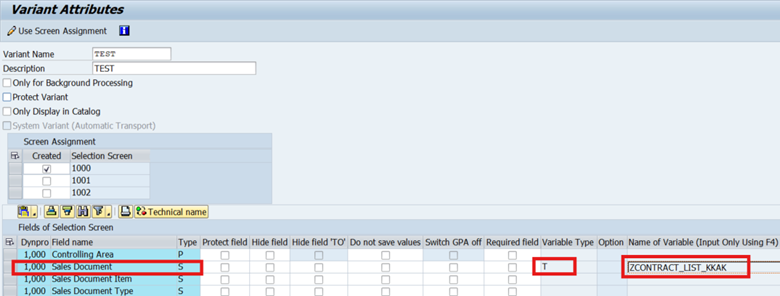
1. Create the Variant: Go to transaction KKAK (or SE38 for program SAPKKA02BG) and define a new variant. In the selection screen, find the sales document (VBELN) field.
2. Link the Dynamic Variable: Instead of entering contract numbers, click on the selection variable button (usually the attribute screen of the variant). For the sales document field, change the selection variable type to 'T' (table variable from TVARVC). In the variable name column, select our custom variable: ZCONTRACT_LIST_KKAK.
Step 3: Coordinating the Background Job (SM36)
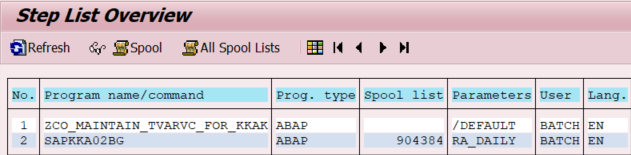
The final piece of the puzzle is the scheduling. For the solution to be seamless, both steps must run in a single unit of work.
- Schedule your custom ABAP program (the one that identifies activity and updates TVARVC).
- Schedule the standard program SAPKKA02BG using the variant created in the previous step.
This is what the steps of the background job look like.
Conclusion
By leveraging a simple custom collector and the standard dynamic variable capabilities of the SAP selection screen, we have built a high-performance, automated daily results analysis process. Most importantly, we have done so while keeping the clean core philosophy intact, avoiding any modifications to standard SAP code.





Comments