

Product prices aren’t as straightforward as they once were.
Condition maintenance enables you to perform mass changes. Nevertheless, you’ll change existing condition records in their current validity period only in rare cases, for example, if you want to correct a mistake. However, condition changes should only take effect starting with a specific date.
This is why, in the Create with Template function, you first select the set of affected condition records and create a new validity period. Because there can’t be overlapping validity periods, when saving the new records, the program sets the end date of the previous validity periods to the last day before the start date of the newly created validity period. The start date of the next interval (if it exists) is set to the first day after the end of the current validity period.
We’ll watch this process using the example of Transaction VK14 (Create with Template). In the first step, we need to select the required condition type to select the affected set of condition records using the offered selection parameters in the next step.
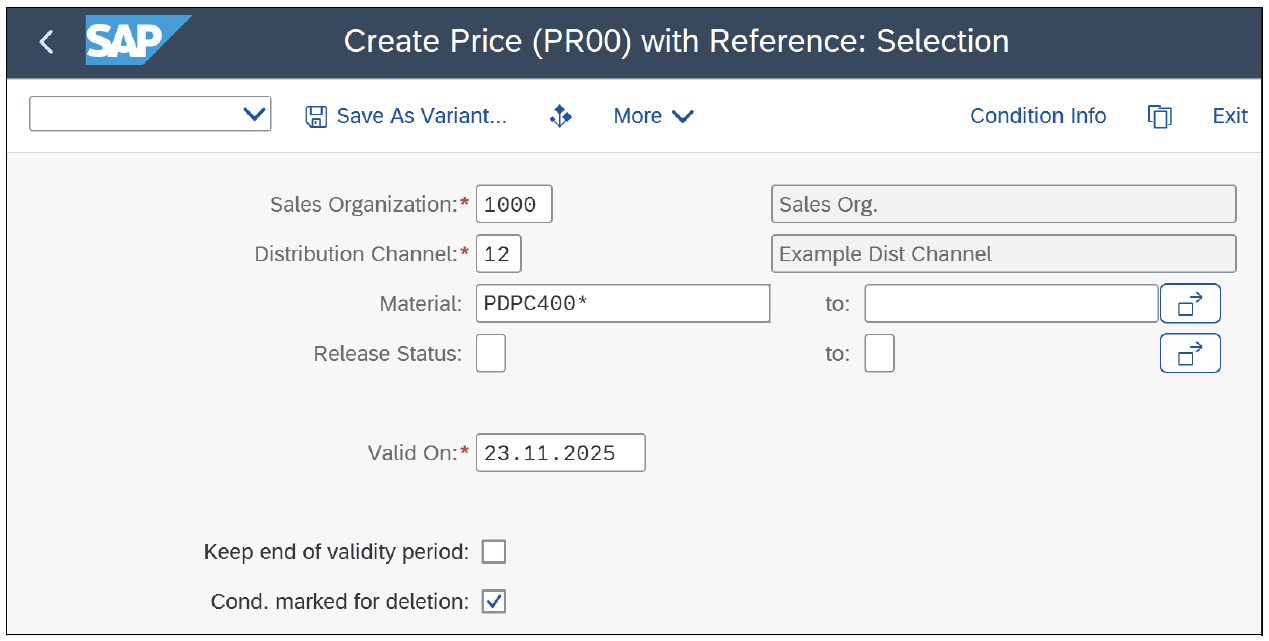
With the date Valid On, the validity periods of the template data are determined. In the lower part of the selection screen, you can find the Keep end of validity period checkbox. If this is selected, the validity end for the conditions is taken from the reference conditions. If not selected, then the validity end for the conditions is proposed from the Customizing of the condition type.
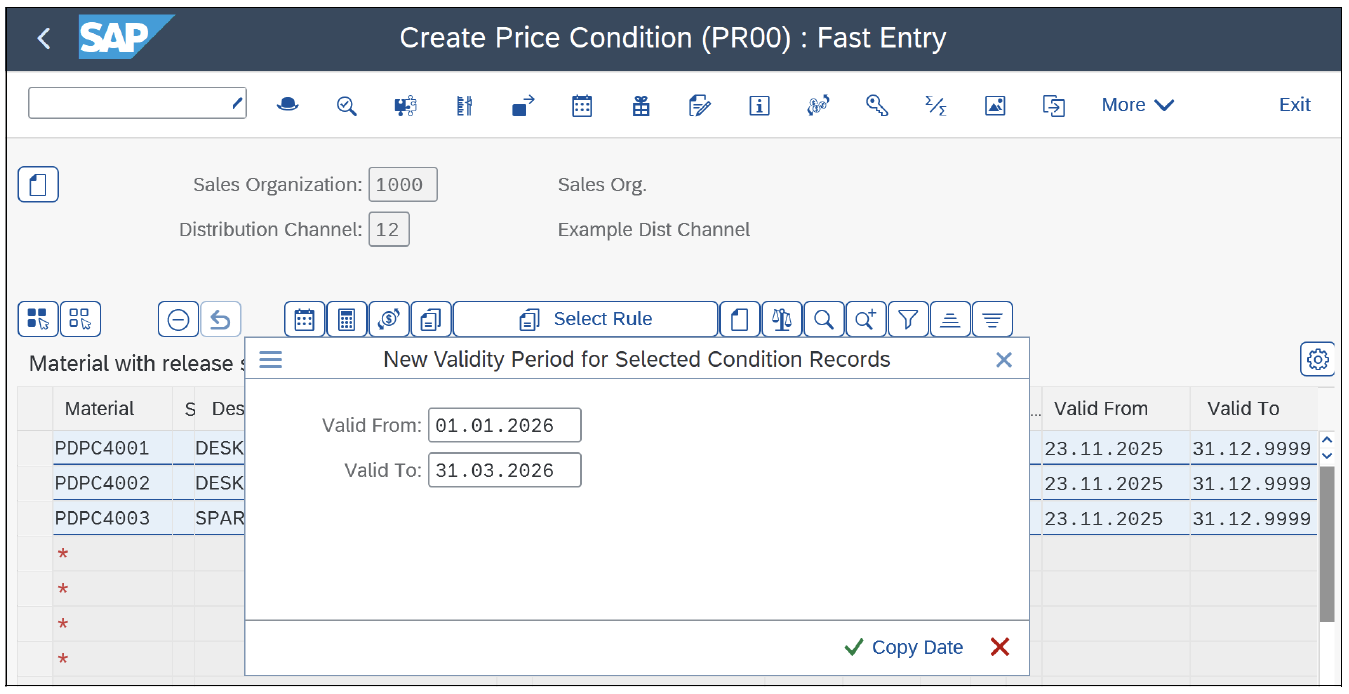
Next, we select the condition records found and set the validity period to the desired start and end dates. In most cases, the start date will be the date of the price change, and the end date will be 31.12.9999—that is, the last validity period that then always runs until further notice. We’ve chosen the example of a limited change in price—for example, from 01.01.2026 until 31.03.2026—to observe how the program-controlled validity period split takes place.
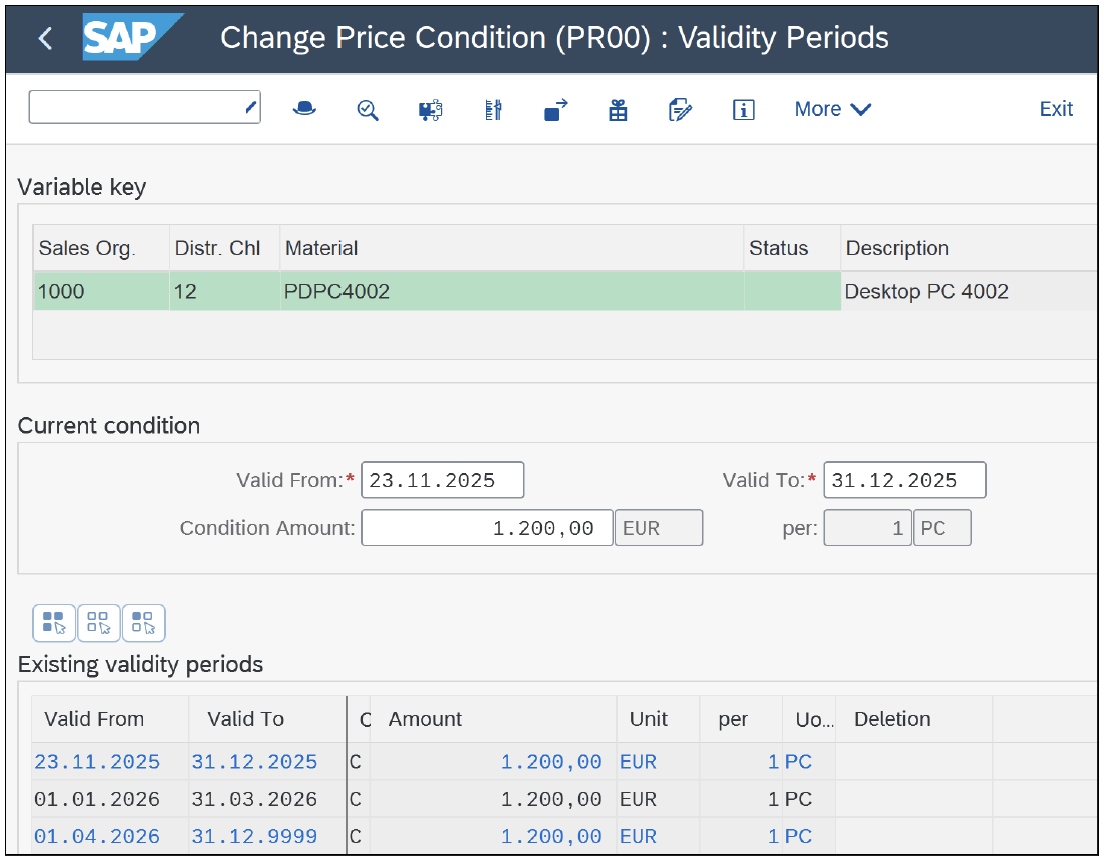
In the next step, you can start Transaction VK12 (Change Condition Records) and set the selection parameter Valid On, for example, to the beginning of the newly created interval in which the price change is to take place. If we now look at the validity periods for the selected condition records, we note that—as previously described—three validity periods have been formed.
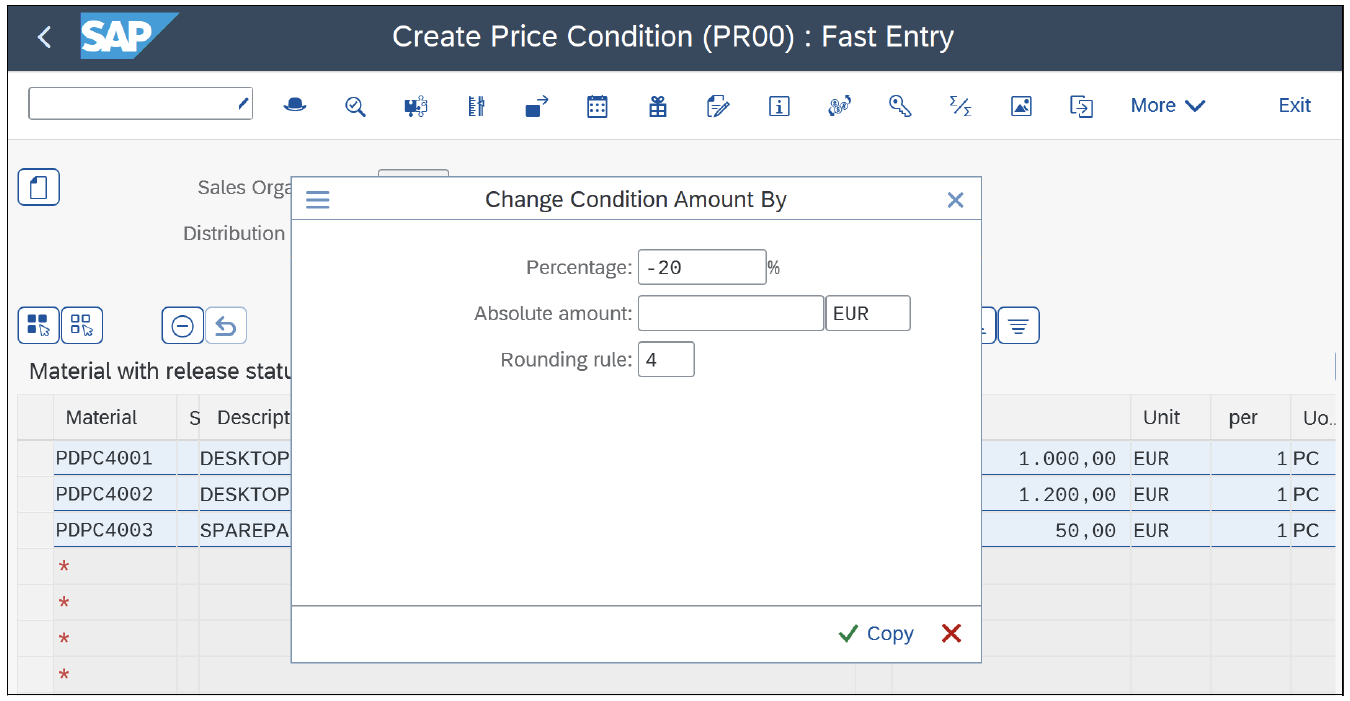
If you select the set of condition records and click the Change amount button, you can specify in a subsequent popup window either Percentage or Absolute amount and optionally choose a Rounding rule (see figure below). After this change, a log with the changed values will be displayed, and the changed data can be saved.
Due to the chosen situation of a limited change in price from 01.01.2026 until 31.03.2026 with the program-controlled validity period split, the situation shown in This is our new result.
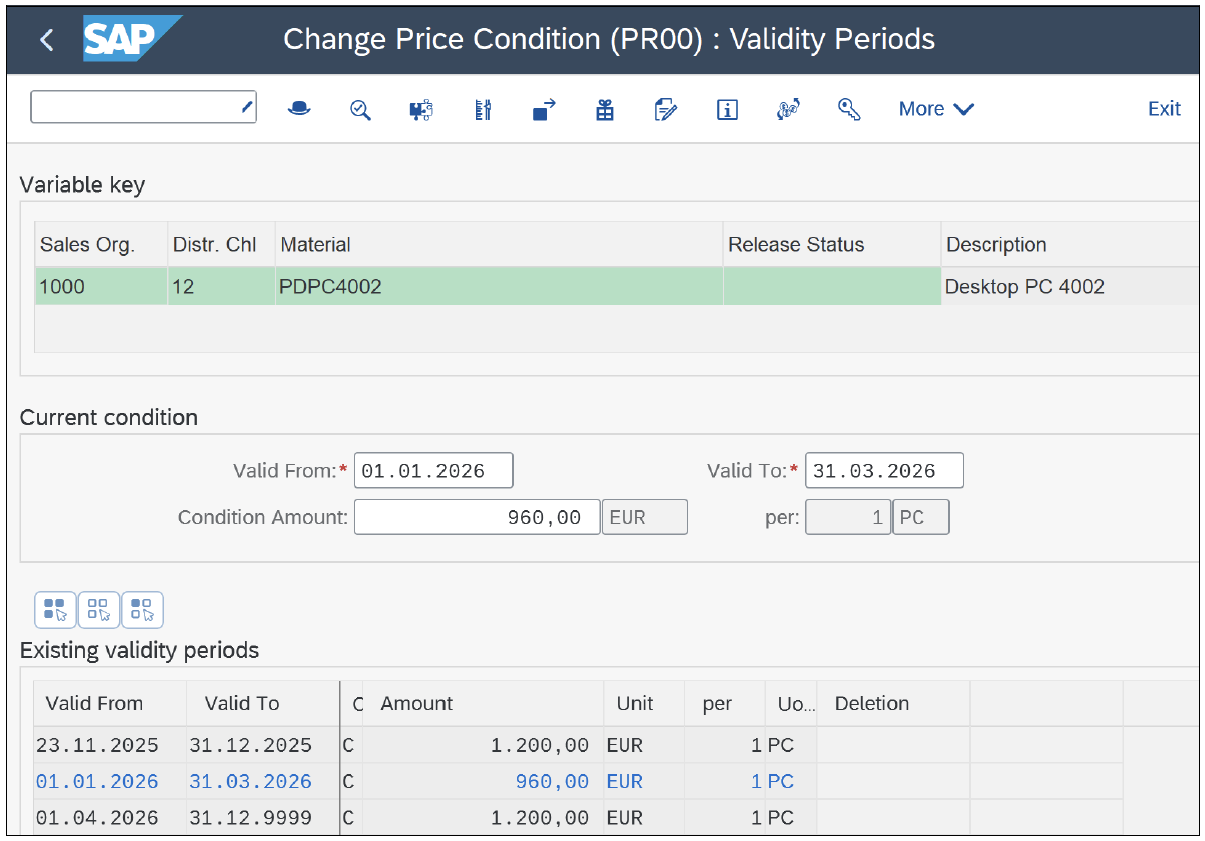
The selected rounding rule 4 has ensured that the new values were set to 0 in the second decimal place. In addition to rule 4, there are three other rounding rules in the standard SAP system.
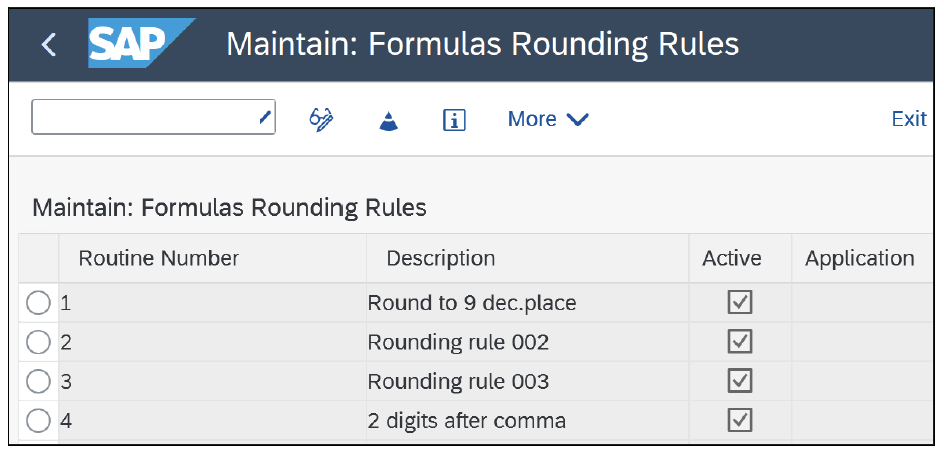
Like most routines in SAP S/4HANA Sales, the rounding rules are maintained with Transaction VOFM (Maintain: Requirements and Formulas). The rounding rules can be found using menu path Formulas > Rounding Rules.
Because these are double-digit routine numbers, the customer namespace is from 50 to 99. By means of customer-specific rounding rules, the behavior when changing the condition amount can be affected in a specific way.
Dive into SD with SAP S/4HANA with this learning journey.
Learn SAP S/4HANA Sales with Rheinwerk Courses!
Ready to level up your SAP S/4HANA Sales skills? Explore our SD-focused online courses, covering the full order-to-cash process from organizational structure, master data, ATP, shipping, and billing to an in-depth deep dive into sales pricing, including the condition technique, pricing procedure configuration, advanced pricing controls, and troubleshooting. Each one is instructor-led (live and on-demand), includes recordings and slide decks, and is designed to give you practical take-away skills you can apply right away in your SAP landscape. Click on the banner below to get started!

Editor’s note: This post has been adapted from a section of the book Pricing and the Condition Technique with SAP S/4HANA by Ursula Becker, Jan Fischer, Werner Herhuth, Manfred Hirn, Markus Urbanek, and Moritz Wilhelm. Ursula has been the development architect responsible for the pricing functionality in SAP solutions since 2009. Jan, product manager for pricing in SAP S/4HANA, joined SAP in 2004. Werner is a certified consultant in the area of order fulfillment in SAP ERP and the author of several SAP courses. Manfred was responsible for the development of the condition technique, as well as the billing and pricing functionalities that he helped program, in SAP R/3. Markus has been the chief development architect and chief product owner for condition contract management and settlement management since 2004. Moritz has been working on the pricing functionality of SAP S/4HANA as a developer and architect since 2018.




Comments