
When working with pricing, output determination, or account determination in SAP S/4HANA Sales, condition tables are the foundational building blocks that make it all work.
Yet for many consultants and developers, they remain a somewhat abstract concept. In this post, we'll demystify condition tables: what they are, how they're structured, and how SAP uses them to store and retrieve condition master data efficiently.
The condition table is the main constituent of the condition master data and essentially forms the primary key. Depending on the condition usage, it’s complemented by additional DDIC tables that contain application-specific data. Our simple example for account determination, however, requires no such additional information.
Definition: Condition Table
The condition table is a DDIC table used to store the condition master data in the database system. It contains essentially the primary key and, in most cases, a pointer to more detailed data.
To maintain and store these condition tables, there’s normally a special maintenance program for each usage (refer to the table below). In simple usages, as in our example (without additional data), master data maintenance is performed via a generated maintenance view.
| Usage | Description | Communication Structure | Sample Table | Sample Report | Module Pool |
| A | Pricing | KOMG | A000 | RV13A000 | SAPMV13A |
| B | Output | KOMB | B000 | RV13B000 | SAPMV13B |
| C | Account determination | KMOCV | C000 | - | - |
| D | Material determination | KOMGD | D000 | RV130000 | SAPMV13D |
| G | Listing and exclusion | KOMGG | G000 | RV130000 | SAPMPV13G |
| H | Batch determination | KOMGH | H000 | RV130000 | SAPMV13H |
| I | Profile determination | KOMI | I000 | RV130000 | SAPMV13I |
| M | Portfolio determination | KMOGM | M000 | RV130000 | SAPLWPOT,00 |
| N | Free goods | KMOG | N000 | RV130000 | SAPMV13N |
The variable key of a condition table is formed in the creation dialog by selecting and arranging the desired fields from the field catalog.
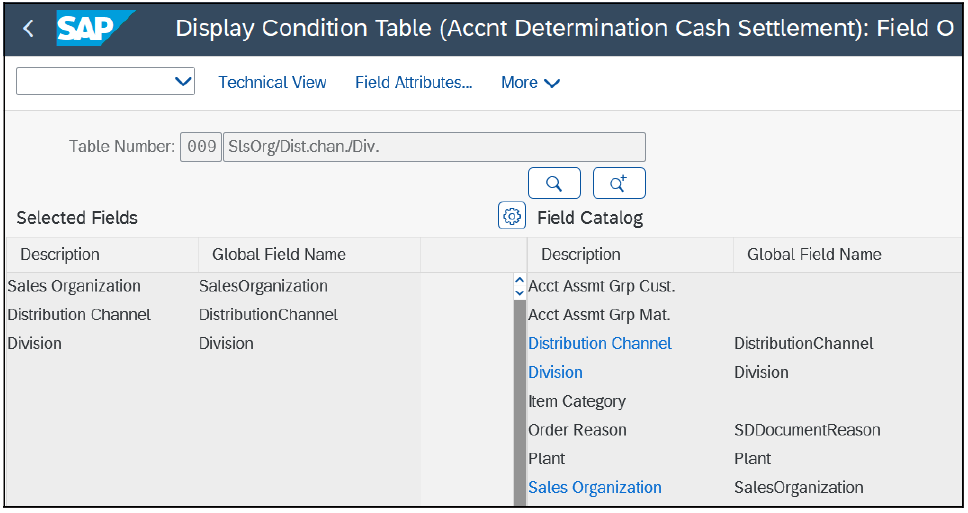
The table definition is stored in the form of metadata; from that data, the corresponding DDIC table is generated. This metadata is cross-client and is stored in the Customizing tables T681 and TMC1*.
From the sequence of the key fields in particular, the generated maintenance screen for master data maintenance is defined. Occasionally, there’s a need to evaluate the condition records stored in the database. It’s quite useful if you know how these are named. The generated DDIC tables usually have the following naming convention:
- First digit: Condition usage
- Second to fourth digit: Number of the condition table
In our account determination example, the DDIC table is C009.
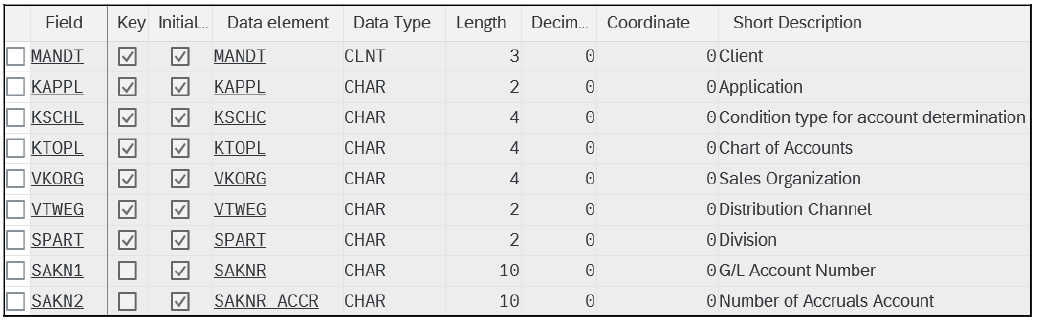
Each condition usage has a sample condition table assigned, for example, table A000 for pricing, table B000 for output determination, and table C000 for account determination. When generating specific condition tables, the placeholder VAKEY is replaced with the actual characteristic fields.
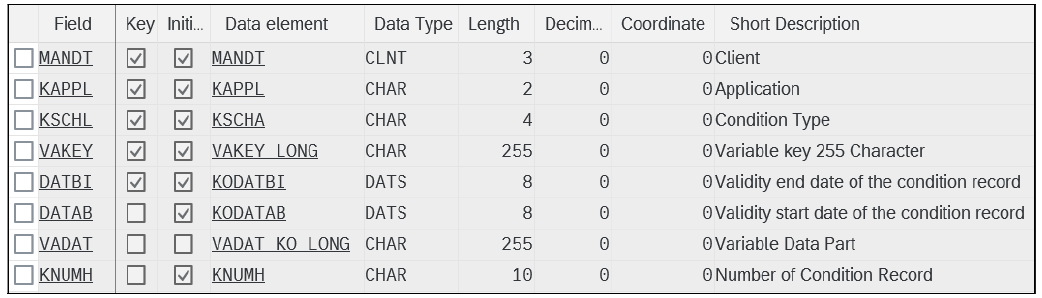
Here, of course, date dependency is essential. In addition to the variable key component VAKEY, you can add variable data fields (non-key components). These are stored similarly to the key fields in the placeholder VADAT.
Note: When setting up new condition tables, you should note that the sum of all variable fields must not exceed a total length of 100 bytes.
Conclusion
Understanding condition tables is essential for anyone configuring or extending condition-based functionality in SAP S/4HANA Sales. From the way key fields are selected out of the field catalog to the naming conventions of the generated DDIC tables, every detail plays a role in how condition records are stored and accessed at runtime. With this foundation in place, you'll be better equipped to design clean, efficient condition table configurations and troubleshoot them when things don't behave as expected.
Learn SAP S/4HANA Sales with Rheinwerk Courses!
Ready to level up your SAP S/4HANA Sales skills? Explore our SD-focused online courses, covering the full order-to-cash process from organizational structure, master data, ATP, shipping, and billing to an in-depth deep dive into sales pricing, including the condition technique, pricing procedure configuration, advanced pricing controls, and troubleshooting. Each one is instructor-led (live and on-demand), includes recordings and slide decks, and is designed to give you practical take-away skills you can apply right away in your SAP landscape. Click on the banner below to get started!

Editor’s note: This post has been adapted from a section of the book Pricing and the Condition Technique with SAP S/4HANA by Ursula Becker, Jan Fischer, Werner Herhuth, Manfred Hirn, Markus Urbanek, and Moritz Wilhelm. Ursula has been the development architect responsible for the pricing functionality in SAP solutions since 2009. Jan, product manager for pricing in SAP S/4HANA, joined SAP in 2004. Werner is a certified consultant in the area of order fulfillment in SAP ERP and the author of several SAP courses. Manfred was responsible for the development of the condition technique, as well as the billing and pricing functionalities that he helped program, in SAP R/3. Markus has been the chief development architect and chief product owner for condition contract management and settlement management since 2004. Moritz has been working on the pricing functionality of SAP S/4HANA as a developer and architect since 2018.
This post was originally published 4/2026.



Comments